

A Dropbox-like file manager that works with every storage protocol:
FTP • FTPS • SFTP • WebDAV • Git • S3 • NFS • SMB • Artifactory • LDAP • Mysql
Sharepoint • Azure • CalDAV • Backblaze B2 • Minio • Storj
IPFS • Dropbox • Google Drive • ...

 Once we had a great user interface for FTP, we extended the idea to virtually every storage protocol and added gateways to expose Dropbox itself as an SFTP server, closing the infamous loop, while also adding all the features we always wished Dropbox had.
# Key Features
- Sleek, Speedy, Snappy, works great on Desktop and Mobile
- Extensible / Customisable / Hackable via a rich ecosystem of plugins and a Workflow engine to enable automation
- Shared Links which you can mount locally as network drives
- Builtin Music, Video, Image viewers with optional transcoding and Chromecast support
- API and LLM integration via [MCP](https://www.filestash.app/docs/api/#mcp) with support for other gateways like SFTP and S3
- [Themes](https://www.filestash.app/docs/plugin/#theme) replicating the UX of [dropbox](https://www.filestash.app/img/screenshots/theme_dropbox.png), [gdrive](https://www.filestash.app/img/screenshots/theme_gdrive.png), [github](https://www.filestash.app/img/screenshots/theme_github.png), [ibm](https://www.filestash.app/img/screenshots/theme_ibm.png), [onedrive](https://www.filestash.app/img/screenshots/theme_onedrive.png), [and more](https://www.filestash.app/img/screenshots/theme_untitled.png)
- ... and much much much more
# Documentation
- [Getting started](https://www.filestash.app/docs/?origin=github)
- [Installation](https://www.filestash.app/docs/install-and-upgrade/?origin=github)
- [API](https://www.filestash.app/docs/api/?origin=github#api) and [MCP](https://www.filestash.app/docs/api/?origin=github#mcp)
- [Plugins Inventory](https://www.filestash.app/docs/plugin/?origin=github)
- [Hardening Guide](https://downloads.filestash.app/upload/hardening-guide.pdf?origin=github)
# Vision & Philosophy
Our goal is simple: **to build the best file management platform ever made. Period.** But "best" means different things to different people, and making Filestash modular is the only sane model to accomplish that. Anything that isn't a fundamental truth of the universe and might spark a debate belongs in a plugin.
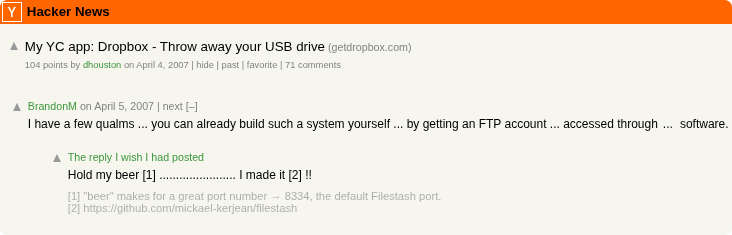
This modularity is made possible by the magic of programming interfaces. For example, if you want a [Dropbox-like frontend for FTP](https://news.ycombinator.com/item?id=9224), you will find out the [FTP plugin](https://github.com/mickael-kerjean/filestash/tree/master/server/plugin/plg_backend_ftp) simply implements this interface:
```go
type IBackend interface {
Ls(path string) ([]os.FileInfo, error) // list files in a folder
Cat(path string) (io.ReadCloser, error) // download a file
Mkdir(path string) error // create a folder
Rm(path string) error // remove something
Mv(from string, to string) error // rename something
Save(path string, file io.Reader) error // save a file
Touch(path string) error // create a file
// I have omitted 2 other methods, a first one to enable connections reuse and
// another one to declare what should the login form be like.
}
```
There are interfaces you can implement for every key component of Filestash: from storage, to authentication, authorisation, custom apps, search, thumbnailing, frontend patches, middleware, endpoint creation and a [few others](https://github.com/mickael-kerjean/filestash/blob/master/server/common/plugin.go).
To see what's currently installed in your instance, head over to [/about](https://demo.filestash.app/about). The inventory of plugins is [documented here](https://www.filestash.app/docs/plugin/).
# Roadmap
There are 2 major pieces of work currently underway:
Once we had a great user interface for FTP, we extended the idea to virtually every storage protocol and added gateways to expose Dropbox itself as an SFTP server, closing the infamous loop, while also adding all the features we always wished Dropbox had.
# Key Features
- Sleek, Speedy, Snappy, works great on Desktop and Mobile
- Extensible / Customisable / Hackable via a rich ecosystem of plugins and a Workflow engine to enable automation
- Shared Links which you can mount locally as network drives
- Builtin Music, Video, Image viewers with optional transcoding and Chromecast support
- API and LLM integration via [MCP](https://www.filestash.app/docs/api/#mcp) with support for other gateways like SFTP and S3
- [Themes](https://www.filestash.app/docs/plugin/#theme) replicating the UX of [dropbox](https://www.filestash.app/img/screenshots/theme_dropbox.png), [gdrive](https://www.filestash.app/img/screenshots/theme_gdrive.png), [github](https://www.filestash.app/img/screenshots/theme_github.png), [ibm](https://www.filestash.app/img/screenshots/theme_ibm.png), [onedrive](https://www.filestash.app/img/screenshots/theme_onedrive.png), [and more](https://www.filestash.app/img/screenshots/theme_untitled.png)
- ... and much much much more
# Documentation
- [Getting started](https://www.filestash.app/docs/?origin=github)
- [Installation](https://www.filestash.app/docs/install-and-upgrade/?origin=github)
- [API](https://www.filestash.app/docs/api/?origin=github#api) and [MCP](https://www.filestash.app/docs/api/?origin=github#mcp)
- [Plugins Inventory](https://www.filestash.app/docs/plugin/?origin=github)
- [Hardening Guide](https://downloads.filestash.app/upload/hardening-guide.pdf?origin=github)
# Vision & Philosophy
Our goal is simple: **to build the best file management platform ever made. Period.** But "best" means different things to different people, and making Filestash modular is the only sane model to accomplish that. Anything that isn't a fundamental truth of the universe and might spark a debate belongs in a plugin.
This modularity is made possible by the magic of programming interfaces. For example, if you want a [Dropbox-like frontend for FTP](https://news.ycombinator.com/item?id=9224), you will find out the [FTP plugin](https://github.com/mickael-kerjean/filestash/tree/master/server/plugin/plg_backend_ftp) simply implements this interface:
```go
type IBackend interface {
Ls(path string) ([]os.FileInfo, error) // list files in a folder
Cat(path string) (io.ReadCloser, error) // download a file
Mkdir(path string) error // create a folder
Rm(path string) error // remove something
Mv(from string, to string) error // rename something
Save(path string, file io.Reader) error // save a file
Touch(path string) error // create a file
// I have omitted 2 other methods, a first one to enable connections reuse and
// another one to declare what should the login form be like.
}
```
There are interfaces you can implement for every key component of Filestash: from storage, to authentication, authorisation, custom apps, search, thumbnailing, frontend patches, middleware, endpoint creation and a [few others](https://github.com/mickael-kerjean/filestash/blob/master/server/common/plugin.go).
To see what's currently installed in your instance, head over to [/about](https://demo.filestash.app/about). The inventory of plugins is [documented here](https://www.filestash.app/docs/plugin/).
# Roadmap
There are 2 major pieces of work currently underway: