Share Chat2DB Repository



Share Chat2DB Repository
 ### Data source management
 ### SQL console
 ### AI intelligent assistant
 ## 🔥 AI Configuration
### CONFIGURE OPENAI
Option 1 (recommended): To use the ChatSql function of OPENAI, two conditions must be met:
- You need an OPENAI_API_KEY.
- The client's network can connect to the OPENAI website, and for users in China, a VPN is required. Note: If the local VPN is not fully effective, the network connectivity can be ensured by setting the network proxy HOST and PORT in the client.
## 🔥 AI Configuration
### CONFIGURE OPENAI
Option 1 (recommended): To use the ChatSql function of OPENAI, two conditions must be met:
- You need an OPENAI_API_KEY.
- The client's network can connect to the OPENAI website, and for users in China, a VPN is required. Note: If the local VPN is not fully effective, the network connectivity can be ensured by setting the network proxy HOST and PORT in the client.
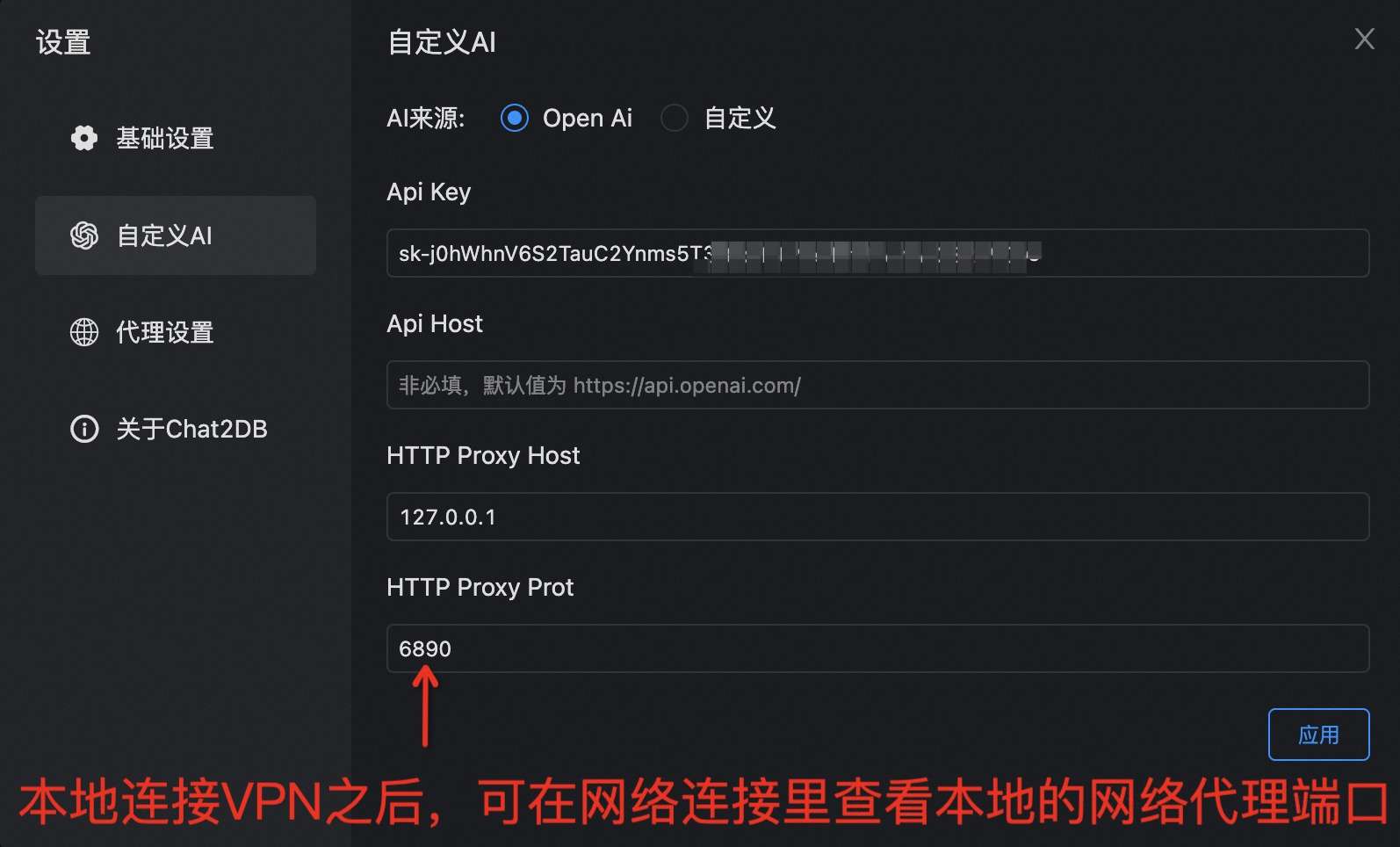 Option 2 (recommended): We provide a unified proxy service.
- No OPENAI_API_KEY is required.
- No proxy or VPN is required, as long as the network is connected.
To facilitate users' quick use of AI capabilities, you can scan the QR code below to follow our WeChat public account and apply for our custom API_KEY.
Option 2 (recommended): We provide a unified proxy service.
- No OPENAI_API_KEY is required.
- No proxy or VPN is required, as long as the network is connected.
To facilitate users' quick use of AI capabilities, you can scan the QR code below to follow our WeChat public account and apply for our custom API_KEY.
 After the application is completed, refer to the following figure for configuration and usage. Config Api Host as http://test.sqlgpt.cn/gateway/api/.
 ### CONFIGURE CUSTOM AI
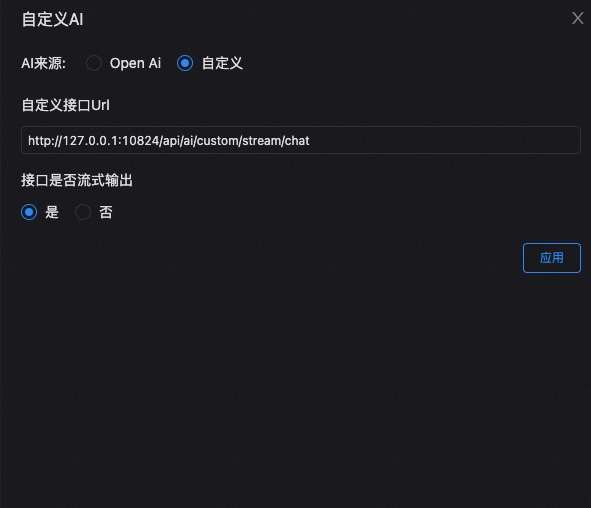
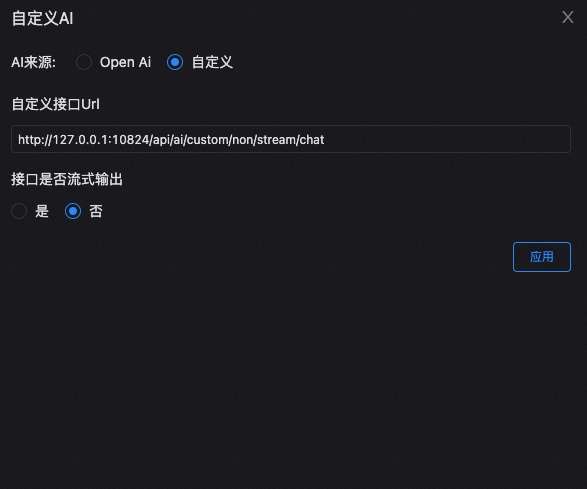
- Customized AI can be any LLM that you deployed, such as ChatGLM、ChatGPT、ERNIE Bot、Tongyi Qianwen, and so on. However, the customized interface need to conform to the protocol definition. Otherwise, secondary development may be required. Two DEMOs are provided in the code, the configuration is as shown below. In specific use, you can refer to the DEMO interface to write a custom interface, or directly perform secondary development in the DEMO interface.
- DEMO for configuring customized stream output interface.
### CONFIGURE CUSTOM AI
- Customized AI can be any LLM that you deployed, such as ChatGLM、ChatGPT、ERNIE Bot、Tongyi Qianwen, and so on. However, the customized interface need to conform to the protocol definition. Otherwise, secondary development may be required. Two DEMOs are provided in the code, the configuration is as shown below. In specific use, you can refer to the DEMO interface to write a custom interface, or directly perform secondary development in the DEMO interface.
- DEMO for configuring customized stream output interface.
 - DEMO for configuring customized non-stream output interface.
 ## 📦 Docker installation
```bash
docker pull chat2db/chat2db:latest
```
## 🎯 Operating Environment
Note: If local debugging is required
- Java runtime Open JDK 17
- JRE reference packaging and deployment method of jre.
- Node runtime environment Node16 Node.js.
## 💻 Local Debugging
- git clone to local
```bash
$ git clone git@github.com:alibaba/Chat2DB.git
```
- Front-End installation
```bash
$ cd Chat2DB/ali-dbhub-client
$ npm install # Mounting front-end dependency
$ npm run build:prod # Package js to the source directory on the back end
```
- Backend debug
```bash
$ cd ../ali-dbhub-server
$ mvn clean install # maven 3.8 or later needs to be installed
$ cd ali-dbhub-server/ali-dbhub-server-start/target/
$ java -jar -Dchatgpt.apiKey=xxxxx ali-dbhub-server-start.jar # To launch the chat application, you need to enter the ChatGPT key for the chatgpt.apiKey. Without entering it, you won't be able to use the AIGC function.
$ # open http://127.0.0.1:10821 to start debug Note: Front-end installation is required
```
- Front-End debug
```bash
$ cd Chat2DB/ali-dbhub-client
$ npm install
$ npm run start
$ # open http://127.0.0.1:10821 to start Front-End debug
$ # Note Front-end page completely depends on the service, so front-end students need to debug the back-end project
```
But front debugging need mapping of resources, you can download [XSwitch](https://chrome.google.com/webstore/detail/idkjhjggpffolpidfkikidcokdkdaogg), add the following configuration file
``` json
{
"proxy": [
[
"http://127.0.0.1:10821/(.*).js$",
"http://127.0.0.1:8001/$1.js",
],
[
"http://127.0.0.1:10821/(.*).css$",
"http://127.0.0.1:8001/$1.css",
],
[
"http://127.0.0.1:10821/static/front/(.*)",
"http://127.0.0.1:8001/$1",
],
[
"http://127.0.0.1:10821/static/(.*)$",
"http://127.0.0.1:8001/static/$1",
],
],
}
```
## 📑 Documentation
* Official website document
* Issue
## Stargazers
[](https://github.com/alibaba/Chat2DB/stargazers)
## Forkers
[](https://github.com/alibaba/Chat2DB/network/members)
## ☎️ Contact Us
Please star and fork on GitHub before joining the group.
Follow our WeChat public account
## ❤️ Acknowledgements
Thanks to all the students who contributed to Chat2DB~
## 📦 Docker installation
```bash
docker pull chat2db/chat2db:latest
```
## 🎯 Operating Environment
Note: If local debugging is required
- Java runtime Open JDK 17
- JRE reference packaging and deployment method of jre.
- Node runtime environment Node16 Node.js.
## 💻 Local Debugging
- git clone to local
```bash
$ git clone git@github.com:alibaba/Chat2DB.git
```
- Front-End installation
```bash
$ cd Chat2DB/ali-dbhub-client
$ npm install # Mounting front-end dependency
$ npm run build:prod # Package js to the source directory on the back end
```
- Backend debug
```bash
$ cd ../ali-dbhub-server
$ mvn clean install # maven 3.8 or later needs to be installed
$ cd ali-dbhub-server/ali-dbhub-server-start/target/
$ java -jar -Dchatgpt.apiKey=xxxxx ali-dbhub-server-start.jar # To launch the chat application, you need to enter the ChatGPT key for the chatgpt.apiKey. Without entering it, you won't be able to use the AIGC function.
$ # open http://127.0.0.1:10821 to start debug Note: Front-end installation is required
```
- Front-End debug
```bash
$ cd Chat2DB/ali-dbhub-client
$ npm install
$ npm run start
$ # open http://127.0.0.1:10821 to start Front-End debug
$ # Note Front-end page completely depends on the service, so front-end students need to debug the back-end project
```
But front debugging need mapping of resources, you can download [XSwitch](https://chrome.google.com/webstore/detail/idkjhjggpffolpidfkikidcokdkdaogg), add the following configuration file
``` json
{
"proxy": [
[
"http://127.0.0.1:10821/(.*).js$",
"http://127.0.0.1:8001/$1.js",
],
[
"http://127.0.0.1:10821/(.*).css$",
"http://127.0.0.1:8001/$1.css",
],
[
"http://127.0.0.1:10821/static/front/(.*)",
"http://127.0.0.1:8001/$1",
],
[
"http://127.0.0.1:10821/static/(.*)$",
"http://127.0.0.1:8001/static/$1",
],
],
}
```
## 📑 Documentation
* Official website document
* Issue
## Stargazers
[](https://github.com/alibaba/Chat2DB/stargazers)
## Forkers
[](https://github.com/alibaba/Chat2DB/network/members)
## ☎️ Contact Us
Please star and fork on GitHub before joining the group.
Follow our WeChat public account
## ❤️ Acknowledgements
Thanks to all the students who contributed to Chat2DB~