# DataKit
**Repository Path**: oplg/datakit
## Basic Information
- **Project Name**: DataKit
- **Description**: 【观测云】是一款面向开发、运维、测试及业务团队的实时数据监测平台,能够统一满足云、云原生、应用及业务上的监测需求,快速实现基础设施、中间件、应用层和业务层的可观测,通过统一的数据采集、全面的数据监控、无缝的关联分析、自定义的场景搭建、高度的可编程性,敏捷的成员协作,为用户提供了最快、最轻松、最全面、最自由的系统可观测平台。
- **Primary Language**: Unknown
- **License**: MIT
- **Default Branch**: main
- **Homepage**: https://docs.guance.com/
- **GVP Project**: No
## Statistics
- **Stars**: 2
- **Forks**: 1
- **Created**: 2023-04-20
- **Last Updated**: 2025-07-13
## Categories & Tags
**Categories**: Uncategorized
**Tags**: None
## README
# DataKit

[](https://app.slack.com/client/T032YB4B6TA/)
[](LICENSE)
[](https://app.fossa.com/projects/git%2Bgithub.com%2FGuanceCloud%2Fdatakit?ref=badge_shield)
DataKit 是一款开源、一体式的数据采集 Agent,它提供全平台操作系统(Linux/Windows/macOS)支持,拥有全面数据采集能力,涵盖主机、容器、中间件、Tracing、日志以及安全巡检等各种场景。
## 主要功能点
- 支持主机、中间件、日志、APM 等领域的指标、日志以及 Tracing 几大类数据采集
- 完整支持 Kubernetes 云原生生态
- [Pipeline](https://docs.guance.com/datakit/pipeline):简便的结构化数据提取
- 支持接入其它第三方数据采集
- [Telegraf](https://docs.guance.com/datakit/telegraf)
- [Prometheus](https://docs.guance.com/datakit/prom)
- [Statsd](https://docs.guance.com/datakit/statsd)
- [Fluentd](https://docs.guance.com/datakit/logstreaming-fluentd)
- [Filebeats](https://docs.guance.com/datakit/beats_output)
- [Function](https://docs.guance.com/dataflux-func/write-data-via-datakit)
- Tracing 相关
- [OpenTelemetry](https://docs.guance.com/datakit/opentelemetry)
- [DDTrace](https://docs.guance.com/datakit/ddtrace)
- [Zipkin](https://docs.guance.com/datakit/zipkin)
- [Jaeger](https://docs.guance.com/datakit/jaeger)
- [Skywalking](https://docs.guance.com/datakit/skywalking)
## 发布历史
DataKit 发布历史参见[这里](https://www.yuque.com/dataflux/datakit/changelog).
## 操作系统最低要求
| 操作系统 | 架构 | 安装路径 |
| --- | --- | --- |
| Linux 内核 2.6.23 或更高版本 | amd64/386/arm/arm64 | `/usr/local/datakit` |
| macOS 10.12 或更高版本([原因](https://github.com/golang/go/issues/25633)) | amd64 | `/usr/local/datakit` |
| Windows 7, Server 2008R2 或更高版本 | amd64/386 | 64位:`C:\Program Files\datakit`
32位:`C:\Program Files(32)\datakit` |
## DataKit 安装
我们可以直接在观测云平台获取 DataKit 安装命令,主流平台的安装命令大概如下:
- Linux & Mac
```shell
DK_DATAWAY="https://openway.guance.com?token=" bash -c "$(curl -L https://static.guance.com/datakit/install.sh)"
```
- Windows
```powershell
Remove-Item -ErrorAction SilentlyContinue Env:DK_*;
$env:DK_DATAWAY="https://openway.guance.com?token=";
Set-ExecutionPolicy Bypass -scope Process -Force;
Import-Module bitstransfer;
start-bitstransfer -source https://static.guance.com/datakit/install.ps1 -destination .install.ps1;
powershell .install.ps1;
Remove-Item .install.ps1;
```
- [Kubernetes DaemonSet](https://www.yuque.com/dataflux/datakit/datakit-daemonset-deploy)
更多关于安装的文档,参见[这里](https://www.yuque.com/dataflux/datakit/datakit-install)。
## 源码编译
DataKit 开发过程中依赖了一些外部工具,我们必须先将这些工具准备好才能比较顺利的编译 DataKit。
> - **建议在 Ubuntu 20.04+ 下编译 DataKit**, 其它 Linux 发行版在安装这些依赖时可能会碰到困难。另外,不建议在 Windows 上编译
> - 请在命令行终端运行 make,暂时尚未针对 Goland/VSCode 等做编译适配
> - 请**先安装这些依赖,然后再 clone 代码**。如果在 DataKit 代码目录来安装这些依赖,可能导致一些 vendor 库拉取的问题
### 设置 Golang
设置 Go 编译环境
> Go-1.18.3 及以上版本
```shell
export GOPRIVATE=gitlab.jiagouyun.com/*
export GOPROXY=https://goproxy.cn,direct
export GOPATH=~/go # 视实际情况而定
export GOROOT=~/golang-1.18.3 # 视实际情况而定
export PATH=$GOROOT/bin:~/go/bin:$PATH
```
### 安装其它工具
> !!! 不要在 datakit 代码目录安装这些工具/依赖,不然会触发包拉取不到的问题。
- make: `apt-get install make`
- gcc: `apt-get install gcc`
- gcc-multilib: `apt-get install -y gcc-multilib`
- tree: `apt-get install tree`
- packr2: `go install github.com/gobuffalo/packr/v2/packr2@v2.8.3`
- goyacc: `go get golang.org/x/tools/cmd/goyacc`
- lint 相关
- lint: `go install github.com/golangci/golangci-lint/cmd/golangci-lint@v1.42.1`
- eBPF 相关(eBPF 不是编译 DataKit 本身必须的,如果不安装它们,只会导致 eBPF 部分编译失败)
- clang 10.0+: `apt-get install clang`
- llvm 10.0+: `apt-get install llvm`
- kernel headers: `apt-get install -y linux-headers-$(uname -r)`
- 文档相关: [waque 1.13.1+](https://github.com/yesmeck/waque)
- 文档工具也不是必须的,可不安装
### 编译
1. 拉取代码:上面这些依赖装好之后,再拉取代码不迟。
```shell
$ mkdir -p $GOPATH/src/gitlab.jiagouyun.com/cloudcare-tools
$ cd $GOPATH/src/gitlab.jiagouyun.com/cloudcare-tools
$ git clone https://github.com/GuanceCloud/datakit.git # 可能被墙
$ git clone https://jihulab.com/guance-cloud/datakit.git # 国内极狐分站
$ cd datakit
```
3. 编译:
```shell
make
```
如果编译通过,将在当前目录的 *dist* 目录下生成如下文件:
```
dist
├── [4.0K] datakit-linux-amd64
│ ├── [ 72M] datakit
│ └── [4.0K] externals
│ ├── [ 14M] logfwd
│ └── [10.0M] oracle
├── [4.0K] local
│ ├── [ 26M] installer-linux-amd64
│ └── [ 228] version
└── [4.0K] standalone
└── [4.0K] datakit-ebpf-linux-amd64
└── [ 38M] datakit-ebpf
```
如果要编译全平台版本,执行:
```shell
make testing
```
## DataKit 基本使用
可通过如下命令查看更多使用方法:
```shell
datakit help
```
## 如何贡献代码
在为我们贡献代码之前:
- 可尝试阅读 DataKit [基本架构介绍](https://www.yuque.com/dataflux/datakit/datakit-arch)
- 请先查看我们的[开发指南](https://www.yuque.com/dataflux/datakit/development)
## 文档
- [DataKit 文档库](https://docs.guance.com/datakit/)
## License
[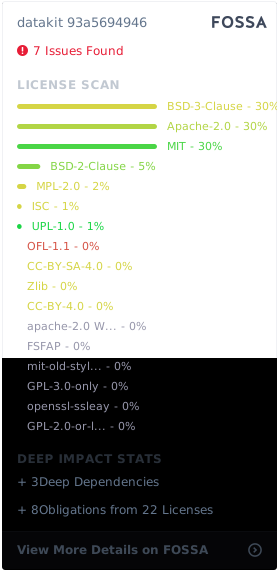](https://app.fossa.com/projects/git%2Bgithub.com%2FGuanceCloud%2Fdatakit?ref=badge_large)