# agentops
**Repository Path**: null_421_8164/agentops
## Basic Information
- **Project Name**: agentops
- **Description**: AgentOps 是一个帮助开发人员测试、调试和部署 AI 代理和 LLM 应用程序的平台
- **Primary Language**: Python
- **License**: MIT
- **Default Branch**: main
- **Homepage**: https://www.oschina.net/p/agentops
- **GVP Project**: No
## Statistics
- **Stars**: 0
- **Forks**: 3
- **Created**: 2025-03-19
- **Last Updated**: 2025-03-19
## Categories & Tags
**Categories**: Uncategorized
**Tags**: None
## README
Observability and DevTool platform for AI Agents



AgentOps helps developers build, evaluate, and monitor AI agents. From prototype to production.
## Key Integrations 🔌
| | |
| ------------------------------------- | ------------------------------------------------------------- |
| 📊 **Replay Analytics and Debugging** | Step-by-step agent execution graphs |
| 💸 **LLM Cost Management** | Track spend with LLM foundation model providers |
| 🧪 **Agent Benchmarking** | Test your agents against 1,000+ evals |
| 🔐 **Compliance and Security** | Detect common prompt injection and data exfiltration exploits |
| 🤝 **Framework Integrations** | Native Integrations with CrewAI, AG2 (AutoGen), Camel AI, & LangChain |
## Quick Start ⌨️
```bash
pip install agentops
```
#### Session replays in 2 lines of code
Initialize the AgentOps client and automatically get analytics on all your LLM calls.
[Get an API key](https://app.agentops.ai/settings/projects)
```python
import agentops
# Beginning of your program (i.e. main.py, __init__.py)
agentops.init( < INSERT YOUR API KEY HERE >)
...
# End of program
agentops.end_session('Success')
```
All your sessions can be viewed on the [AgentOps dashboard](https://app.agentops.ai?ref=gh)
Agent Debugging


Session Replays

Summary Analytics


### First class Developer Experience
Add powerful observability to your agents, tools, and functions with as little code as possible: one line at a time.
Refer to our [documentation](http://docs.agentops.ai)
```python
# Automatically associate all Events with the agent that originated them
from agentops import track_agent
@track_agent(name='SomeCustomName')
class MyAgent:
...
```
```python
# Automatically create ToolEvents for tools that agents will use
from agentops import record_tool
@record_tool('SampleToolName')
def sample_tool(...):
...
```
```python
# Automatically create ActionEvents for other functions.
from agentops import record_action
@agentops.record_action('sample function being record')
def sample_function(...):
...
```
```python
# Manually record any other Events
from agentops import record, ActionEvent
record(ActionEvent("received_user_input"))
```
## Integrations 🦾
### OpenAI Agents SDK 🖇️
Build multi-agent systems with tools, handoffs, and guardrails. AgentOps provides first-class integration with OpenAI Agents.
```bash
pip install agents-sdk
```
- [AgentOps integration example](https://docs.agentops.ai/v1/integrations/agentssdk)
- [Official CrewAI documentation](https://docs.crewai.com/how-to/AgentOps-Observability)
### CrewAI 🛶
Build Crew agents with observability in just 2 lines of code. Simply set an `AGENTOPS_API_KEY` in your environment, and your crews will get automatic monitoring on the AgentOps dashboard.
```bash
pip install 'crewai[agentops]'
```
- [AgentOps integration example](https://docs.agentops.ai/v1/integrations/crewai)
- [Official CrewAI documentation](https://docs.crewai.com/how-to/AgentOps-Observability)
### AG2 🤖
With only two lines of code, add full observability and monitoring to AG2 (formerly AutoGen) agents. Set an `AGENTOPS_API_KEY` in your environment and call `agentops.init()`
- [AG2 Observability Example](https://docs.ag2.ai/notebooks/agentchat_agentops)
- [AG2 - AgentOps Documentation](https://docs.ag2.ai/docs/ecosystem/agentops)
### Camel AI 🐪
Track and analyze CAMEL agents with full observability. Set an `AGENTOPS_API_KEY` in your environment and initialize AgentOps to get started.
- [Camel AI](https://www.camel-ai.org/) - Advanced agent communication framework
- [AgentOps integration example](https://docs.agentops.ai/v1/integrations/camel)
- [Official Camel AI documentation](https://docs.camel-ai.org/cookbooks/agents_tracking.html)
Installation
```bash
pip install "camel-ai[all]==0.2.11"
pip install agentops
```
```python
import os
import agentops
from camel.agents import ChatAgent
from camel.messages import BaseMessage
from camel.models import ModelFactory
from camel.types import ModelPlatformType, ModelType
# Initialize AgentOps
agentops.init(os.getenv("AGENTOPS_API_KEY"), default_tags=["CAMEL Example"])
# Import toolkits after AgentOps init for tracking
from camel.toolkits import SearchToolkit
# Set up the agent with search tools
sys_msg = BaseMessage.make_assistant_message(
role_name='Tools calling operator',
content='You are a helpful assistant'
)
# Configure tools and model
tools = [*SearchToolkit().get_tools()]
model = ModelFactory.create(
model_platform=ModelPlatformType.OPENAI,
model_type=ModelType.GPT_4O_MINI,
)
# Create and run the agent
camel_agent = ChatAgent(
system_message=sys_msg,
model=model,
tools=tools,
)
response = camel_agent.step("What is AgentOps?")
print(response)
agentops.end_session("Success")
```
Check out our [Camel integration guide](https://docs.agentops.ai/v1/integrations/camel) for more examples including multi-agent scenarios.
### Langchain 🦜🔗
AgentOps works seamlessly with applications built using Langchain. To use the handler, install Langchain as an optional dependency:
Installation
```shell
pip install agentops[langchain]
```
To use the handler, import and set
```python
import os
from langchain.chat_models import ChatOpenAI
from langchain.agents import initialize_agent, AgentType
from agentops.partners.langchain_callback_handler import LangchainCallbackHandler
AGENTOPS_API_KEY = os.environ['AGENTOPS_API_KEY']
handler = LangchainCallbackHandler(api_key=AGENTOPS_API_KEY, tags=['Langchain Example'])
llm = ChatOpenAI(openai_api_key=OPENAI_API_KEY,
callbacks=[handler],
model='gpt-3.5-turbo')
agent = initialize_agent(tools,
llm,
agent=AgentType.CHAT_ZERO_SHOT_REACT_DESCRIPTION,
verbose=True,
callbacks=[handler], # You must pass in a callback handler to record your agent
handle_parsing_errors=True)
```
Check out the [Langchain Examples Notebook](./examples/langchain_examples.ipynb) for more details including Async handlers.
### Cohere ⌨️
First class support for Cohere(>=5.4.0). This is a living integration, should you need any added functionality please message us on Discord!
- [AgentOps integration example](https://docs.agentops.ai/v1/integrations/cohere)
- [Official Cohere documentation](https://docs.cohere.com/reference/about)
Installation
```bash
pip install cohere
```
```python python
import cohere
import agentops
# Beginning of program's code (i.e. main.py, __init__.py)
agentops.init()
co = cohere.Client()
chat = co.chat(
message="Is it pronounced ceaux-hear or co-hehray?"
)
print(chat)
agentops.end_session('Success')
```
```python python
import cohere
import agentops
# Beginning of program's code (i.e. main.py, __init__.py)
agentops.init()
co = cohere.Client()
stream = co.chat_stream(
message="Write me a haiku about the synergies between Cohere and AgentOps"
)
for event in stream:
if event.event_type == "text-generation":
print(event.text, end='')
agentops.end_session('Success')
```
### Anthropic ﹨
Track agents built with the Anthropic Python SDK (>=0.32.0).
- [AgentOps integration guide](https://docs.agentops.ai/v1/integrations/anthropic)
- [Official Anthropic documentation](https://docs.anthropic.com/en/docs/welcome)
Installation
```bash
pip install anthropic
```
```python python
import anthropic
import agentops
# Beginning of program's code (i.e. main.py, __init__.py)
agentops.init()
client = anthropic.Anthropic(
# This is the default and can be omitted
api_key=os.environ.get("ANTHROPIC_API_KEY"),
)
message = client.messages.create(
max_tokens=1024,
messages=[
{
"role": "user",
"content": "Tell me a cool fact about AgentOps",
}
],
model="claude-3-opus-20240229",
)
print(message.content)
agentops.end_session('Success')
```
Streaming
```python python
import anthropic
import agentops
# Beginning of program's code (i.e. main.py, __init__.py)
agentops.init()
client = anthropic.Anthropic(
# This is the default and can be omitted
api_key=os.environ.get("ANTHROPIC_API_KEY"),
)
stream = client.messages.create(
max_tokens=1024,
model="claude-3-opus-20240229",
messages=[
{
"role": "user",
"content": "Tell me something cool about streaming agents",
}
],
stream=True,
)
response = ""
for event in stream:
if event.type == "content_block_delta":
response += event.delta.text
elif event.type == "message_stop":
print("\n")
print(response)
print("\n")
```
Async
```python python
import asyncio
from anthropic import AsyncAnthropic
client = AsyncAnthropic(
# This is the default and can be omitted
api_key=os.environ.get("ANTHROPIC_API_KEY"),
)
async def main() -> None:
message = await client.messages.create(
max_tokens=1024,
messages=[
{
"role": "user",
"content": "Tell me something interesting about async agents",
}
],
model="claude-3-opus-20240229",
)
print(message.content)
await main()
```
### Mistral 〽️
Track agents built with the Mistral Python SDK (>=0.32.0).
- [AgentOps integration example](./examples/mistral//mistral_example.ipynb)
- [Official Mistral documentation](https://docs.mistral.ai)
Installation
```bash
pip install mistralai
```
Sync
```python python
from mistralai import Mistral
import agentops
# Beginning of program's code (i.e. main.py, __init__.py)
agentops.init()
client = Mistral(
# This is the default and can be omitted
api_key=os.environ.get("MISTRAL_API_KEY"),
)
message = client.chat.complete(
messages=[
{
"role": "user",
"content": "Tell me a cool fact about AgentOps",
}
],
model="open-mistral-nemo",
)
print(message.choices[0].message.content)
agentops.end_session('Success')
```
Streaming
```python python
from mistralai import Mistral
import agentops
# Beginning of program's code (i.e. main.py, __init__.py)
agentops.init()
client = Mistral(
# This is the default and can be omitted
api_key=os.environ.get("MISTRAL_API_KEY"),
)
message = client.chat.stream(
messages=[
{
"role": "user",
"content": "Tell me something cool about streaming agents",
}
],
model="open-mistral-nemo",
)
response = ""
for event in message:
if event.data.choices[0].finish_reason == "stop":
print("\n")
print(response)
print("\n")
else:
response += event.text
agentops.end_session('Success')
```
Async
```python python
import asyncio
from mistralai import Mistral
client = Mistral(
# This is the default and can be omitted
api_key=os.environ.get("MISTRAL_API_KEY"),
)
async def main() -> None:
message = await client.chat.complete_async(
messages=[
{
"role": "user",
"content": "Tell me something interesting about async agents",
}
],
model="open-mistral-nemo",
)
print(message.choices[0].message.content)
await main()
```
Async Streaming
```python python
import asyncio
from mistralai import Mistral
client = Mistral(
# This is the default and can be omitted
api_key=os.environ.get("MISTRAL_API_KEY"),
)
async def main() -> None:
message = await client.chat.stream_async(
messages=[
{
"role": "user",
"content": "Tell me something interesting about async streaming agents",
}
],
model="open-mistral-nemo",
)
response = ""
async for event in message:
if event.data.choices[0].finish_reason == "stop":
print("\n")
print(response)
print("\n")
else:
response += event.text
await main()
```
### CamelAI ﹨
Track agents built with the CamelAI Python SDK (>=0.32.0).
- [CamelAI integration guide](https://docs.camel-ai.org/cookbooks/agents_tracking.html#)
- [Official CamelAI documentation](https://docs.camel-ai.org/index.html)
Installation
```bash
pip install camel-ai[all]
pip install agentops
```
```python python
#Import Dependencies
import agentops
import os
from getpass import getpass
from dotenv import load_dotenv
#Set Keys
load_dotenv()
openai_api_key = os.getenv("OPENAI_API_KEY") or ""
agentops_api_key = os.getenv("AGENTOPS_API_KEY") or ""
```
[You can find usage examples here!](examples/camelai_examples/README.md).
### LiteLLM 🚅
AgentOps provides support for LiteLLM(>=1.3.1), allowing you to call 100+ LLMs using the same Input/Output Format.
- [AgentOps integration example](https://docs.agentops.ai/v1/integrations/litellm)
- [Official LiteLLM documentation](https://docs.litellm.ai/docs/providers)
Installation
```bash
pip install litellm
```
```python python
# Do not use LiteLLM like this
# from litellm import completion
# ...
# response = completion(model="claude-3", messages=messages)
# Use LiteLLM like this
import litellm
...
response = litellm.completion(model="claude-3", messages=messages)
# or
response = await litellm.acompletion(model="claude-3", messages=messages)
```
### LlamaIndex 🦙
AgentOps works seamlessly with applications built using LlamaIndex, a framework for building context-augmented generative AI applications with LLMs.
Installation
```shell
pip install llama-index-instrumentation-agentops
```
To use the handler, import and set
```python
from llama_index.core import set_global_handler
# NOTE: Feel free to set your AgentOps environment variables (e.g., 'AGENTOPS_API_KEY')
# as outlined in the AgentOps documentation, or pass the equivalent keyword arguments
# anticipated by AgentOps' AOClient as **eval_params in set_global_handler.
set_global_handler("agentops")
```
Check out the [LlamaIndex docs](https://docs.llamaindex.ai/en/stable/module_guides/observability/?h=agentops#agentops) for more details.
### Llama Stack 🦙🥞
AgentOps provides support for Llama Stack Python Client(>=0.0.53), allowing you to monitor your Agentic applications.
- [AgentOps integration example 1](https://github.com/AgentOps-AI/agentops/pull/530/files/65a5ab4fdcf310326f191d4b870d4f553591e3ea#diff-fdddf65549f3714f8f007ce7dfd1cde720329fe54155d54389dd50fbd81813cb)
- [AgentOps integration example 2](https://github.com/AgentOps-AI/agentops/pull/530/files/65a5ab4fdcf310326f191d4b870d4f553591e3ea#diff-6688ff4fb7ab1ce7b1cc9b8362ca27264a3060c16737fb1d850305787a6e3699)
- [Official Llama Stack Python Client](https://github.com/meta-llama/llama-stack-client-python)
### SwarmZero AI 🐝
Track and analyze SwarmZero agents with full observability. Set an `AGENTOPS_API_KEY` in your environment and initialize AgentOps to get started.
- [SwarmZero](https://swarmzero.ai) - Advanced multi-agent framework
- [AgentOps integration example](https://docs.agentops.ai/v1/integrations/swarmzero)
- [SwarmZero AI integration example](https://docs.swarmzero.ai/examples/ai-agents/build-and-monitor-a-web-search-agent)
- [SwarmZero AI - AgentOps documentation](https://docs.swarmzero.ai/sdk/observability/agentops)
- [Official SwarmZero Python SDK](https://github.com/swarmzero/swarmzero)
Installation
```bash
pip install swarmzero
pip install agentops
```
```python
from dotenv import load_dotenv
load_dotenv()
import agentops
agentops.init()
from swarmzero import Agent, Swarm
# ...
```
## Time travel debugging 🔮
[Try it out!](https://app.agentops.ai/timetravel)
## Agent Arena 🥊
(coming soon!)
## Evaluations Roadmap 🧭
| Platform | Dashboard | Evals |
| ---------------------------------------------------------------------------- | ------------------------------------------ | -------------------------------------- |
| ✅ Python SDK | ✅ Multi-session and Cross-session metrics | ✅ Custom eval metrics |
| 🚧 Evaluation builder API | ✅ Custom event tag tracking | 🔜 Agent scorecards |
| ✅ [Javascript/Typescript SDK](https://github.com/AgentOps-AI/agentops-node) | ✅ Session replays | 🔜 Evaluation playground + leaderboard |
## Debugging Roadmap 🧭
| Performance testing | Environments | LLM Testing | Reasoning and execution testing |
| ----------------------------------------- | ----------------------------------------------------------------------------------- | ------------------------------------------- | ------------------------------------------------- |
| ✅ Event latency analysis | 🔜 Non-stationary environment testing | 🔜 LLM non-deterministic function detection | 🚧 Infinite loops and recursive thought detection |
| ✅ Agent workflow execution pricing | 🔜 Multi-modal environments | 🚧 Token limit overflow flags | 🔜 Faulty reasoning detection |
| 🚧 Success validators (external) | 🔜 Execution containers | 🔜 Context limit overflow flags | 🔜 Generative code validators |
| 🔜 Agent controllers/skill tests | ✅ Honeypot and prompt injection detection ([PromptArmor](https://promptarmor.com)) | 🔜 API bill tracking | 🔜 Error breakpoint analysis |
| 🔜 Information context constraint testing | 🔜 Anti-agent roadblocks (i.e. Captchas) | 🔜 CI/CD integration checks | |
| 🔜 Regression testing | 🔜 Multi-agent framework visualization | | |
### Why AgentOps? 🤔
Without the right tools, AI agents are slow, expensive, and unreliable. Our mission is to bring your agent from prototype to production. Here's why AgentOps stands out:
- **Comprehensive Observability**: Track your AI agents' performance, user interactions, and API usage.
- **Real-Time Monitoring**: Get instant insights with session replays, metrics, and live monitoring tools.
- **Cost Control**: Monitor and manage your spend on LLM and API calls.
- **Failure Detection**: Quickly identify and respond to agent failures and multi-agent interaction issues.
- **Tool Usage Statistics**: Understand how your agents utilize external tools with detailed analytics.
- **Session-Wide Metrics**: Gain a holistic view of your agents' sessions with comprehensive statistics.
AgentOps is designed to make agent observability, testing, and monitoring easy.
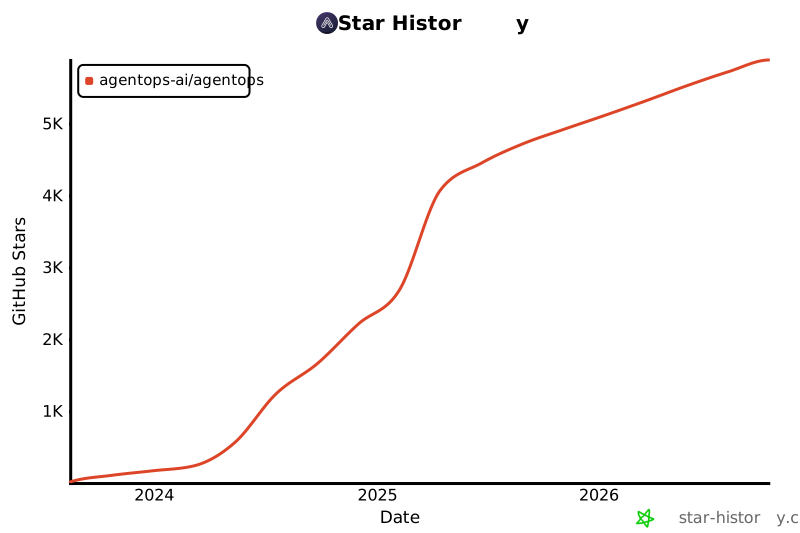
## Star History
Check out our growth in the community:
 ## Popular projects using AgentOps
| Repository | Stars |
| :-------- | -----: |
|
## Popular projects using AgentOps
| Repository | Stars |
| :-------- | -----: |
| [geekan](https://github.com/geekan) / [MetaGPT](https://github.com/geekan/MetaGPT) | 42787 |
|
[geekan](https://github.com/geekan) / [MetaGPT](https://github.com/geekan/MetaGPT) | 42787 |
| [run-llama](https://github.com/run-llama) / [llama_index](https://github.com/run-llama/llama_index) | 34446 |
|
[run-llama](https://github.com/run-llama) / [llama_index](https://github.com/run-llama/llama_index) | 34446 |
| [crewAIInc](https://github.com/crewAIInc) / [crewAI](https://github.com/crewAIInc/crewAI) | 18287 |
|
[crewAIInc](https://github.com/crewAIInc) / [crewAI](https://github.com/crewAIInc/crewAI) | 18287 |
| [camel-ai](https://github.com/camel-ai) / [camel](https://github.com/camel-ai/camel) | 5166 |
|
[camel-ai](https://github.com/camel-ai) / [camel](https://github.com/camel-ai/camel) | 5166 |
| [superagent-ai](https://github.com/superagent-ai) / [superagent](https://github.com/superagent-ai/superagent) | 5050 |
|
[superagent-ai](https://github.com/superagent-ai) / [superagent](https://github.com/superagent-ai/superagent) | 5050 |
| [iyaja](https://github.com/iyaja) / [llama-fs](https://github.com/iyaja/llama-fs) | 4713 |
|
[iyaja](https://github.com/iyaja) / [llama-fs](https://github.com/iyaja/llama-fs) | 4713 |
| [BasedHardware](https://github.com/BasedHardware) / [Omi](https://github.com/BasedHardware/Omi) | 2723 |
|
[BasedHardware](https://github.com/BasedHardware) / [Omi](https://github.com/BasedHardware/Omi) | 2723 |
| [MervinPraison](https://github.com/MervinPraison) / [PraisonAI](https://github.com/MervinPraison/PraisonAI) | 2007 |
|
[MervinPraison](https://github.com/MervinPraison) / [PraisonAI](https://github.com/MervinPraison/PraisonAI) | 2007 |
| [AgentOps-AI](https://github.com/AgentOps-AI) / [Jaiqu](https://github.com/AgentOps-AI/Jaiqu) | 272 |
|
[AgentOps-AI](https://github.com/AgentOps-AI) / [Jaiqu](https://github.com/AgentOps-AI/Jaiqu) | 272 |
| [swarmzero](https://github.com/swarmzero) / [swarmzero](https://github.com/swarmzero/swarmzero) | 195 |
|
[swarmzero](https://github.com/swarmzero) / [swarmzero](https://github.com/swarmzero/swarmzero) | 195 |
| [strnad](https://github.com/strnad) / [CrewAI-Studio](https://github.com/strnad/CrewAI-Studio) | 134 |
|
[strnad](https://github.com/strnad) / [CrewAI-Studio](https://github.com/strnad/CrewAI-Studio) | 134 |
| [alejandro-ao](https://github.com/alejandro-ao) / [exa-crewai](https://github.com/alejandro-ao/exa-crewai) | 55 |
|
[alejandro-ao](https://github.com/alejandro-ao) / [exa-crewai](https://github.com/alejandro-ao/exa-crewai) | 55 |
| [tonykipkemboi](https://github.com/tonykipkemboi) / [youtube_yapper_trapper](https://github.com/tonykipkemboi/youtube_yapper_trapper) | 47 |
|
[tonykipkemboi](https://github.com/tonykipkemboi) / [youtube_yapper_trapper](https://github.com/tonykipkemboi/youtube_yapper_trapper) | 47 |
| [sethcoast](https://github.com/sethcoast) / [cover-letter-builder](https://github.com/sethcoast/cover-letter-builder) | 27 |
|
[sethcoast](https://github.com/sethcoast) / [cover-letter-builder](https://github.com/sethcoast/cover-letter-builder) | 27 |
| [bhancockio](https://github.com/bhancockio) / [chatgpt4o-analysis](https://github.com/bhancockio/chatgpt4o-analysis) | 19 |
|
[bhancockio](https://github.com/bhancockio) / [chatgpt4o-analysis](https://github.com/bhancockio/chatgpt4o-analysis) | 19 |
| [breakstring](https://github.com/breakstring) / [Agentic_Story_Book_Workflow](https://github.com/breakstring/Agentic_Story_Book_Workflow) | 14 |
|
[breakstring](https://github.com/breakstring) / [Agentic_Story_Book_Workflow](https://github.com/breakstring/Agentic_Story_Book_Workflow) | 14 |
| [MULTI-ON](https://github.com/MULTI-ON) / [multion-python](https://github.com/MULTI-ON/multion-python) | 13 |
_Generated using [github-dependents-info](https://github.com/nvuillam/github-dependents-info), by [Nicolas Vuillamy](https://github.com/nvuillam)_
[MULTI-ON](https://github.com/MULTI-ON) / [multion-python](https://github.com/MULTI-ON/multion-python) | 13 |
_Generated using [github-dependents-info](https://github.com/nvuillam/github-dependents-info), by [Nicolas Vuillamy](https://github.com/nvuillam)_ 




