# springSecurity
**Repository Path**: misszyg/spring-security
## Basic Information
- **Project Name**: springSecurity
- **Description**: 学习springSecurity
- **Primary Language**: Unknown
- **License**: Not specified
- **Default Branch**: main
- **Homepage**: None
- **GVP Project**: No
## Statistics
- **Stars**: 2
- **Forks**: 3
- **Created**: 2023-03-10
- **Last Updated**: 2024-07-02
## Categories & Tags
**Categories**: Uncategorized
**Tags**: None
## README
## 2022.11.28完结!!!!
# SpringSecurity学习记录(B站三更草堂)
## 简介
**Spring Security** 是 Spring 家族中的一个安全管理框架。相比与另外一个安全框架 **Shiro**,它提供了更丰富的功能,社区资源也比 Shiro 丰富。
一般来说中大型的项目都是使用 **SpringSecurity** 来做安全框架。小项目有 Shiro 的比较多,因为相比与 SpringSecurity,Shiro 的上手更加的简单。
一般 Web 应用的需要进行**认证**和**授权**。
**认证:验证当前访问系统的是不是本系统的用户,并且要确认具体是哪个用户**
**授权:经过认证后判断当前用户是否有权限进行某个操作**
而认证和授权也是 SpringSecurity 作为安全框架的核心功能。
## 1. 快速入门
### 1.1 准备工作
我们先要搭建一个简单的 SpringBoot 工程
① 设置父工程 添加依赖
```java
org.springframework.boot
spring-boot-starter-parent
2.5.0
org.springframework.boot
spring-boot-starter-web
org.projectlombok
lombok
true
```
② 创建启动类
```java
@SpringBootApplication
public class SecurityApplication {
public static void main(String[] args) {
SpringApplication.run(SecurityApplication.class,args);
}
}
```
③ 创建 Controller
```java
import org.springframework.web.bind.annotation.RequestMapping;
import org.springframework.web.bind.annotation.RestController;
@RestController
public class HelloController {
@RequestMapping("/hello")
public String hello(){
return "hello";
}
}
```
### 1.2 引入 SpringSecurity
在 SpringBoot 项目中使用 SpringSecurity 我们只需要引入依赖即可实现入门案例。
```java
org.springframework.boot
spring-boot-starter-security
```
引入依赖后我们在尝试去访问之前的接口就会自动跳转到一个 SpringSecurity 的默认登陆页面,默认用户名是 user, 密码会输出在控制台。
必须登陆之后才能对接口进行访问。
## 2. 认证
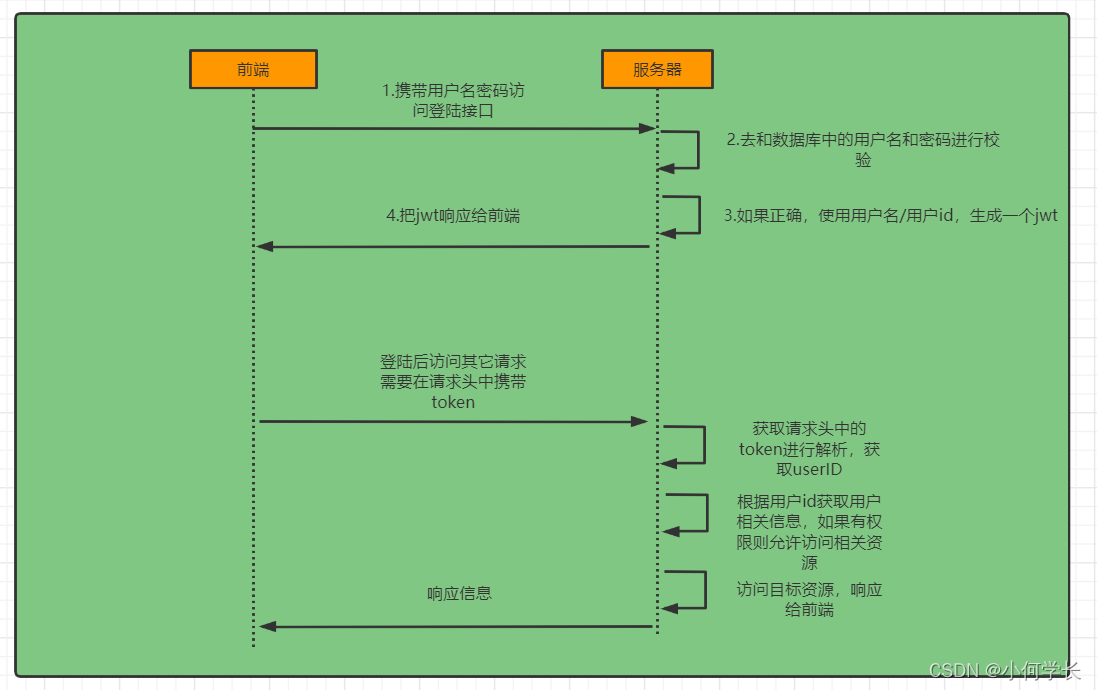
### 2.1 登陆校验流程
### 2.2 原理初探
想要知道如何实现自己的登陆流程就必须要先知道入门案例中 SpringSecurity 的流程。
2.2.1 SpringSecurity 完整流程
SpringSecurity 的原理其实就是一个过滤器链,内部包含了提供各种功能的过滤器。这里我们可以看看入门案例中的过滤器。
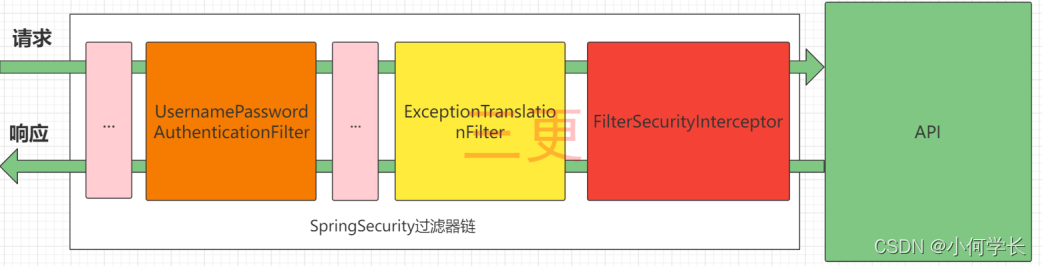
图中只展示了核心过滤器,其它的非核心过滤器并没有在图中展示。
**UsernamePasswordAuthenticationFilter**: 负责处理我们在登陆页面填写了用户名密码后的登陆请求。入门案例的认证工作主要有它负责。
**ExceptionTranslationFilter:** 处理过滤器链中抛出的任何 AccessDeniedException 和 AuthenticationException 。
**FilterSecurityInterceptor:** 负责权限校验的过滤器。
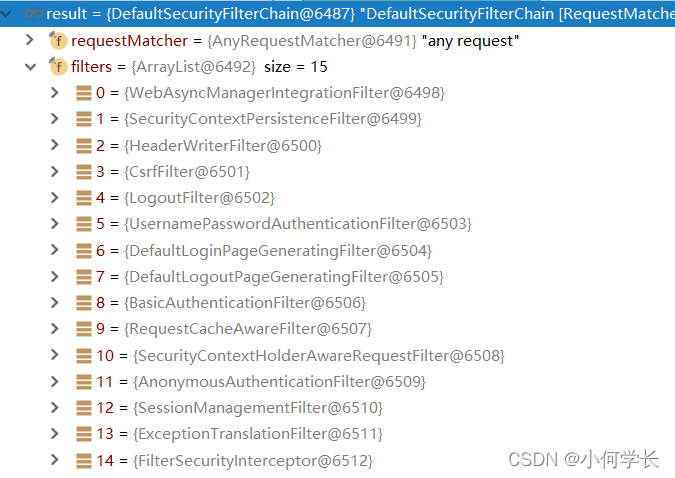
我们可以通过 Debug 查看当前系统中 SpringSecurity 过滤器链中有哪些过滤器及它们的顺序。
2.2.2 认证流程详解
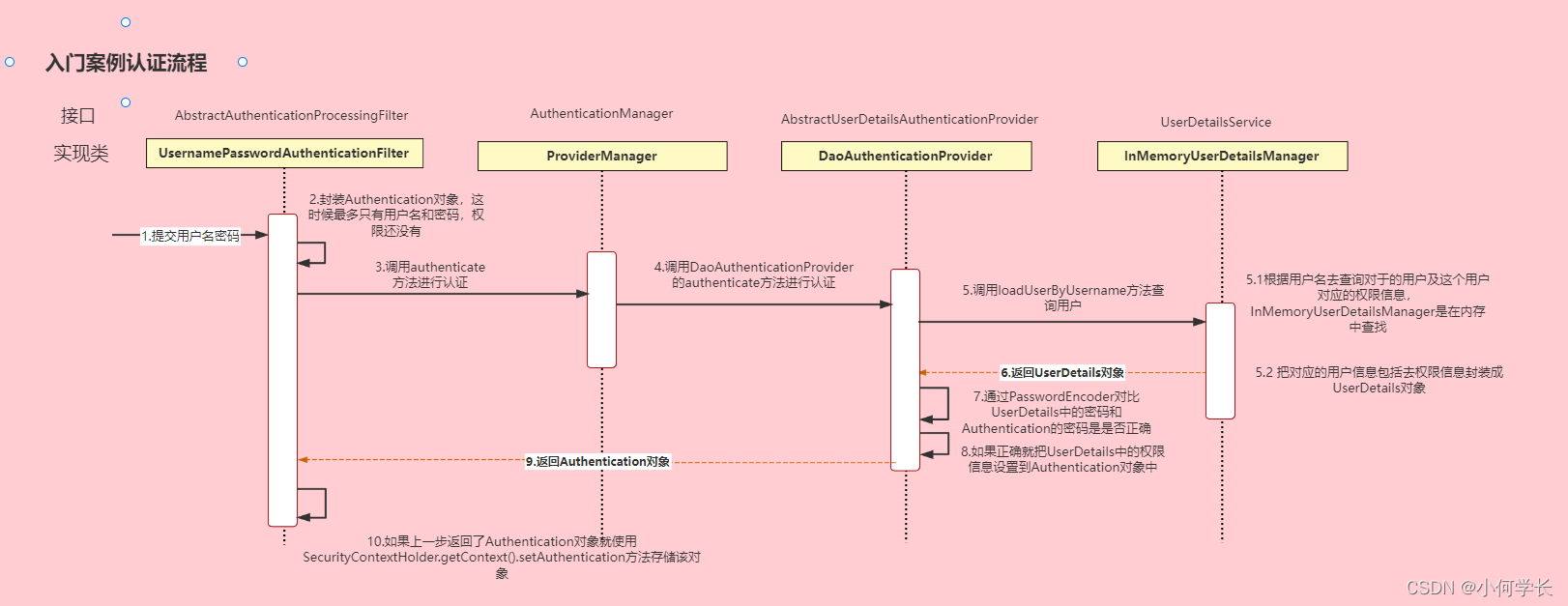
概念速查:
Authentication 接口: 它的实现类,表示当前访问系统的用户,封装了用户相关信息。
AuthenticationManager 接口:定义了认证 Authentication 的方法
UserDetailsService 接口:加载用户特定数据的核心接口。里面定义了一个根据用户名查询用户信息的方法。
UserDetails 接口:提供核心用户信息。通过 UserDetailsService 根据用户名获取处理的用户信息要封装成 UserDetails 对象返回。然后将这些信息封装到 Authentication 对象中。
### 2.3 解决问题
2.3.1 思路分析
登录
①自定义登录接口
调用 ProviderManager 的方法进行认证 如果认证通过生成 jwt
把用户信息存入 redis 中
②自定义 UserDetailsService
在这个实现类中去查询数据库
校验:
①定义 Jwt 认证过滤器
获取 token
解析 token 获取其中的 userid
从 redis 中获取用户信息
存入 SecurityContextHolder
2.3.2 准备工作
①添加依赖
```java
org.springframework.boot
spring-boot-starter-data-redis
com.alibaba
fastjson
1.2.33
io.jsonwebtoken
jjwt
0.9.0
```
② 添加 Redis 相关配置
```java
import com.alibaba.fastjson.JSON;
import com.alibaba.fastjson.serializer.SerializerFeature;
import com.fasterxml.jackson.databind.JavaType;
import com.fasterxml.jackson.databind.ObjectMapper;
import com.fasterxml.jackson.databind.type.TypeFactory;
import org.springframework.data.redis.serializer.RedisSerializer;
import org.springframework.data.redis.serializer.SerializationException;
import com.alibaba.fastjson.parser.ParserConfig;
import org.springframework.util.Assert;
import java.nio.charset.Charset;
/**
* Redis使用FastJson序列化
*
* @author sg
*/
public class FastJsonRedisSerializer implements RedisSerializer
{
public static final Charset DEFAULT_CHARSET = Charset.forName("UTF-8");
private Class clazz;
static
{
ParserConfig.getGlobalInstance().setAutoTypeSupport(true);
}
public FastJsonRedisSerializer(Class clazz)
{
super();
this.clazz = clazz;
}
@Override
public byte[] serialize(T t) throws SerializationException
{
if (t == null)
{
return new byte[0];
}
return JSON.toJSONString(t, SerializerFeature.WriteClassName).getBytes(DEFAULT_CHARSET);
}
@Override
public T deserialize(byte[] bytes) throws SerializationException
{
if (bytes == null || bytes.length <= 0)
{
return null;
}
String str = new String(bytes, DEFAULT_CHARSET);
return JSON.parseObject(str, clazz);
}
protected JavaType getJavaType(Class clazz)
{
return TypeFactory.defaultInstance().constructType(clazz);
}
}
```
```java
import org.springframework.context.annotation.Bean;
import org.springframework.context.annotation.Configuration;
import org.springframework.data.redis.connection.RedisConnectionFactory;
import org.springframework.data.redis.core.RedisTemplate;
import org.springframework.data.redis.serializer.StringRedisSerializer;
@Configuration
public class RedisConfig {
@Bean
@SuppressWarnings(value = { "unchecked", "rawtypes" })
public RedisTemplate redisTemplate(RedisConnectionFactory connectionFactory)
{
RedisTemplate template = new RedisTemplate<>();
template.setConnectionFactory(connectionFactory);
FastJsonRedisSerializer serializer = new FastJsonRedisSerializer(Object.class);
// 使用StringRedisSerializer来序列化和反序列化redis的key值
template.setKeySerializer(new StringRedisSerializer());
template.setValueSerializer(serializer);
// Hash的key也采用StringRedisSerializer的序列化方式
template.setHashKeySerializer(new StringRedisSerializer());
template.setHashValueSerializer(serializer);
template.afterPropertiesSet();
return template;
}
}
```
③ 响应类
```java
import com.fasterxml.jackson.annotation.JsonInclude;
@JsonInclude(JsonInclude.Include.NON_NULL)
public class ResponseResult {
/**
* 状态码
*/
private Integer code;
/**
* 提示信息,如果有错误时,前端可以获取该字段进行提示
*/
private String msg;
/**
* 查询到的结果数据,
*/
private T data;
public ResponseResult(Integer code, String msg) {
this.code = code;
this.msg = msg;
}
public ResponseResult(Integer code, T data) {
this.code = code;
this.data = data;
}
public Integer getCode() {
return code;
}
public void setCode(Integer code) {
this.code = code;
}
public String getMsg() {
return msg;
}
public void setMsg(String msg) {
this.msg = msg;
}
public T getData() {
return data;
}
public void setData(T data) {
this.data = data;
}
public ResponseResult(Integer code, String msg, T data) {
this.code = code;
this.msg = msg;
this.data = data;
}
}
```
④工具类
```java
import io.jsonwebtoken.Claims;
import io.jsonwebtoken.JwtBuilder;
import io.jsonwebtoken.Jwts;
import io.jsonwebtoken.SignatureAlgorithm;
import javax.crypto.SecretKey;
import javax.crypto.spec.SecretKeySpec;
import java.util.Base64;
import java.util.Date;
import java.util.UUID;
/**
* JWT工具类
*/
public class JwtUtil {
//有效期为
public static final Long JWT_TTL = 60 * 60 *1000L;// 60 * 60 *1000 一个小时
//设置秘钥明文
public static final String JWT_KEY = "sangeng";
public static String getUUID(){
String token = UUID.randomUUID().toString().replaceAll("-", "");
return token;
}
/**
* 生成jtw
* @param subject token中要存放的数据(json格式)
* @return
*/
public static String createJWT(String subject) {
JwtBuilder builder = getJwtBuilder(subject, null, getUUID());// 设置过期时间
return builder.compact();
}
/**
* 生成jtw
* @param subject token中要存放的数据(json格式)
* @param ttlMillis token超时时间
* @return
*/
public static String createJWT(String subject, Long ttlMillis) {
JwtBuilder builder = getJwtBuilder(subject, ttlMillis, getUUID());// 设置过期时间
return builder.compact();
}
private static JwtBuilder getJwtBuilder(String subject, Long ttlMillis, String uuid) {
SignatureAlgorithm signatureAlgorithm = SignatureAlgorithm.HS256;
SecretKey secretKey = generalKey();
long nowMillis = System.currentTimeMillis();
Date now = new Date(nowMillis);
if(ttlMillis==null){
ttlMillis=JwtUtil.JWT_TTL;
}
long expMillis = nowMillis + ttlMillis;
Date expDate = new Date(expMillis);
return Jwts.builder()
.setId(uuid) //唯一的ID
.setSubject(subject) // 主题 可以是JSON数据
.setIssuer("sg") // 签发者
.setIssuedAt(now) // 签发时间
.signWith(signatureAlgorithm, secretKey) //使用HS256对称加密算法签名, 第二个参数为秘钥
.setExpiration(expDate);
}
/**
* 创建token
* @param id
* @param subject
* @param ttlMillis
* @return
*/
public static String createJWT(String id, String subject, Long ttlMillis) {
JwtBuilder builder = getJwtBuilder(subject, ttlMillis, id);// 设置过期时间
return builder.compact();
}
public static void main(String[] args) throws Exception {
String token = "eyJhbGciOiJIUzI1NiJ9.eyJqdGkiOiJjYWM2ZDVhZi1mNjVlLTQ0MDAtYjcxMi0zYWEwOGIyOTIwYjQiLCJzdWIiOiJzZyIsImlzcyI6InNnIiwiaWF0IjoxNjM4MTA2NzEyLCJleHAiOjE2MzgxMTAzMTJ9.JVsSbkP94wuczb4QryQbAke3ysBDIL5ou8fWsbt_ebg";
Claims claims = parseJWT(token);
System.out.println(claims);
}
/**
* 生成加密后的秘钥 secretKey
* @return
*/
public static SecretKey generalKey() {
byte[] encodedKey = Base64.getDecoder().decode(JwtUtil.JWT_KEY);
SecretKey key = new SecretKeySpec(encodedKey, 0, encodedKey.length, "AES");
return key;
}
/**
* 解析
*
* @param jwt
* @return
* @throws Exception
*/
public static Claims parseJWT(String jwt) throws Exception {
SecretKey secretKey = generalKey();
return Jwts.parser()
.setSigningKey(secretKey)
.parseClaimsJws(jwt)
.getBody();
}
}
```
```java
import java.util.*;
import java.util.concurrent.TimeUnit;
@SuppressWarnings(value = { "unchecked", "rawtypes" })
@Component
public class RedisCache
{
@Autowired
public RedisTemplate redisTemplate;
/**
* 缓存基本的对象,Integer、String、实体类等
*
* @param key 缓存的键值
* @param value 缓存的值
*/
public void setCacheObject(final String key, final T value)
{
redisTemplate.opsForValue().set(key, value);
}
/**
* 缓存基本的对象,Integer、String、实体类等
*
* @param key 缓存的键值
* @param value 缓存的值
* @param timeout 时间
* @param timeUnit 时间颗粒度
*/
public void setCacheObject(final String key, final T value, final Integer timeout, final TimeUnit timeUnit)
{
redisTemplate.opsForValue().set(key, value, timeout, timeUnit);
}
/**
* 设置有效时间
*
* @param key Redis键
* @param timeout 超时时间
* @return true=设置成功;false=设置失败
*/
public boolean expire(final String key, final long timeout)
{
return expire(key, timeout, TimeUnit.SECONDS);
}
/**
* 设置有效时间
*
* @param key Redis键
* @param timeout 超时时间
* @param unit 时间单位
* @return true=设置成功;false=设置失败
*/
public boolean expire(final String key, final long timeout, final TimeUnit unit)
{
return redisTemplate.expire(key, timeout, unit);
}
/**
* 获得缓存的基本对象。
*
* @param key 缓存键值
* @return 缓存键值对应的数据
*/
public T getCacheObject(final String key)
{
ValueOperations operation = redisTemplate.opsForValue();
return operation.get(key);
}
/**
* 删除单个对象
*
* @param key
*/
public boolean deleteObject(final String key)
{
return redisTemplate.delete(key);
}
/**
* 删除集合对象
*
* @param collection 多个对象
* @return
*/
public long deleteObject(final Collection collection)
{
return redisTemplate.delete(collection);
}
/**
* 缓存List数据
*
* @param key 缓存的键值
* @param dataList 待缓存的List数据
* @return 缓存的对象
*/
public long setCacheList(final String key, final List dataList)
{
Long count = redisTemplate.opsForList().rightPushAll(key, dataList);
return count == null ? 0 : count;
}
/**
* 获得缓存的list对象
*
* @param key 缓存的键值
* @return 缓存键值对应的数据
*/
public List getCacheList(final String key)
{
return redisTemplate.opsForList().range(key, 0, -1);
}
/**
* 缓存Set
*
* @param key 缓存键值
* @param dataSet 缓存的数据
* @return 缓存数据的对象
*/
public BoundSetOperations setCacheSet(final String key, final Set dataSet)
{
BoundSetOperations setOperation = redisTemplate.boundSetOps(key);
Iterator it = dataSet.iterator();
while (it.hasNext())
{
setOperation.add(it.next());
}
return setOperation;
}
/**
* 获得缓存的set
*
* @param key
* @return
*/
public Set getCacheSet(final String key)
{
return redisTemplate.opsForSet().members(key);
}
/**
* 缓存Map
*
* @param key
* @param dataMap
*/
public void setCacheMap(final String key, final Map dataMap)
{
if (dataMap != null) {
redisTemplate.opsForHash().putAll(key, dataMap);
}
}
/**
* 获得缓存的Map
*
* @param key
* @return
*/
public Map getCacheMap(final String key)
{
return redisTemplate.opsForHash().entries(key);
}
/**
* 往Hash中存入数据
*
* @param key Redis键
* @param hKey Hash键
* @param value 值
*/
public void setCacheMapValue(final String key, final String hKey, final T value)
{
redisTemplate.opsForHash().put(key, hKey, value);
}
/**
* 获取Hash中的数据
*
* @param key Redis键
* @param hKey Hash键
* @return Hash中的对象
*/
public T getCacheMapValue(final String key, final String hKey)
{
HashOperations opsForHash = redisTemplate.opsForHash();
return opsForHash.get(key, hKey);
}
/**
* 删除Hash中的数据
*
* @param key
* @param hkey
*/
public void delCacheMapValue(final String key, final String hkey)
{
HashOperations hashOperations = redisTemplate.opsForHash();
hashOperations.delete(key, hkey);
}
/**
* 获取多个Hash中的数据
*
* @param key Redis键
* @param hKeys Hash键集合
* @return Hash对象集合
*/
public List getMultiCacheMapValue(final String key, final Collection