# nndeploy
**Repository Path**: mirrors/nndeploy
## Basic Information
- **Project Name**: nndeploy
- **Description**: nndeploy是一个简单易用、高性能、支持多端的AI推理部署框架
- **Primary Language**: C/C++
- **License**: Apache-2.0
- **Default Branch**: main
- **Homepage**: https://www.oschina.net/p/nndeploy
- **GVP Project**: No
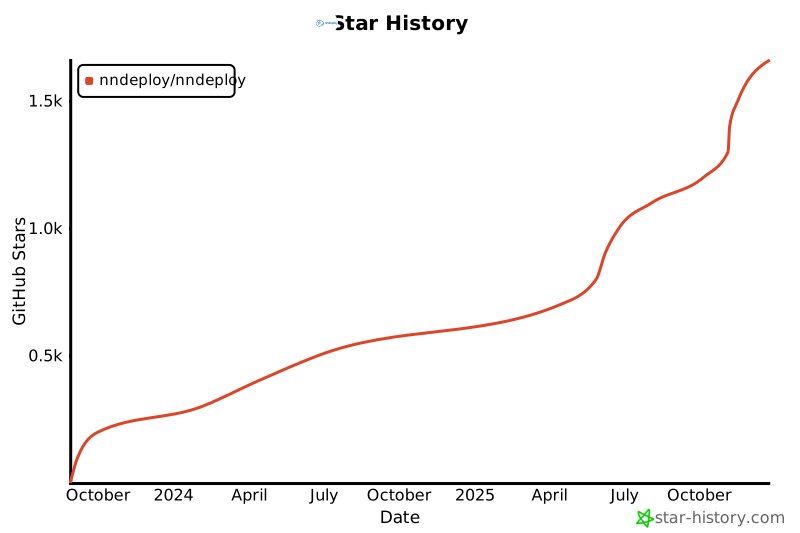
## Statistics
- **Stars**: 1
- **Forks**: 1
- **Created**: 2025-05-30
- **Last Updated**: 2025-12-27
## Categories & Tags
**Categories**: Uncategorized
**Tags**: None
## README
[English](README_EN.md) | 简体中文
nndeploy:一款简单易用和高性能的AI部署框架


文档
| Ask DeepWiki
| 微信
| Discord

---
## 介绍
nndeploy 是一款简单易用和高性能的 AI 部署框架。解决的是 AI 算法在端侧部署的问题,包含桌面端(Windows、macOS)、移动端(Android、iOS)、边缘计算设备(NVIDIA Jetson、Ascend310B、RK 等)以及单机服务器(RTX 系列、T4、Ascend310P 等),**基于可视化工作流和多端推理,可让 AI 算法在上述平台和硬件更高效、更高性能的落地。**
**针对10B以上的大模型(如大语言模型和 AIGC 生成模型),nndeploy 适合作为一款可视化工作流工具。**
### **简单易用**
- **可视化工作流**:拖拽节点即可部署 AI 算法,参数实时可调,效果一目了然。
- **自定义节点**:支持 Python/C++自定义节点,无论是用 Python 实现预处理,还是用 C++/CUDA 编写高性能节点,均可无缝集成到与可视化工作流。
- **一键部署**:工作流支持导出为 JSON,可通过 C++/Python API 调用,适用于 Linux、Windows、macOS、Android 等平台
### **高性能**
- **并行优化**:支持串行、流水线并行、任务并行等执行模式
- **内存优化**:零拷贝、内存池、内存复用等优化策略
- **高性能优化**:内置 C++/CUDA/Ascend C/SIMD 等优化实现的节点
- **多端推理**:一套工作流适配多端推理,深度集成 13 种主流推理框架,全面覆盖云端服务器、桌面应用、移动设备、边缘计算等全平台部署场景。框架支持灵活选择推理引擎,可按需编译减少依赖,同时支持接入自定义推理框架的独立运行模式。
| 推理框架 | 状态 |
| :------------------------------------------------------------------------------- | :--- |
| [ONNXRuntime](https://github.com/microsoft/onnxruntime) | ✅ |
| [TensorRT](https://github.com/NVIDIA/TensorRT) | ✅ |
| [OpenVINO](https://github.com/openvinotoolkit/openvino) | ✅ |
| [MNN](https://github.com/alibaba/MNN) | ✅ |
| [TNN](https://github.com/Tencent/TNN) | ✅ |
| [ncnn](https://github.com/Tencent/ncnn) | ✅ |
| [CoreML](https://github.com/apple/coremltools) | ✅ |
| [AscendCL](https://www.hiascend.com/zh/) | ✅ |
| [RKNN](https://www.rock-chips.com/a/cn/downloadcenter/BriefDatasheet/index.html) | ✅ |
| [SNPE](https://developer.qualcomm.com/software/qualcomm-neural-processing-sdk) | ✅ |
| [TVM](https://github.com/apache/tvm) | ✅ |
| [PyTorch](https://pytorch.org/) | ✅ |
| [nndeploy内部推理子模块](docs/zh_cn/inference/README_INFERENCE.md) | ✅ |
### **开箱即用的算法**
已部署多类 AI 模型,并开发 100+可视化节点,实现开箱即用体验。随着部署节点数量的增加,节点库的复用性不断提升,这将显著降低后续算法部署的开发成本。我们还将持续部署更多具有实用价值的算法。
| Application Scenario | Available Models | Remarks |
| -------------------------- | ------------------------------------------------------------------------------- | ------------------------------------------------------------------------------- |
| **Large Language Models** | **QWen-2.5**, **QWen-3** | Support small B models |
| **Image/Video Generation** | Stable Diffusion 1.5, Stable Diffusion XL, Stable Diffusion 3, HunyuanDiT, etc. | Support text-to-image, image-to-image, image inpainting, based on **diffusers** |
| **Face Swapping** | **deep-live-cam** | |
| **OCR** | **Paddle OCR** | |
| **Object Detection** | **YOLOv5, YOLOv6, YOLOv7, YOLOv8, YOLOv11, YOLOx** | |
| **Object Tracking** | FairMot | |
| **Image Segmentation** | RBMGv1.4, PPMatting, **Segment Anything** | |
| **Classification** | ResNet, MobileNet, EfficientNet, PPLcNet, GhostNet, ShuffleNet, SqueezeNet | |
| **API Services** | OPENAI, DeepSeek, Moonshot | Support LLM and AIGC services |
> 更多查看[已部署模型列表详解](docs/zh_cn/quick_start/model_list.md)
## 快速开始
- **步骤一:安装**
```bash
pip install --upgrade nndeploy
```
- **步骤二:启动可视化界面**
```bash
# 方式一:命令行
nndeploy-app --port 8000
# 方式二:代码启动
cd path/to/nndeploy
python app.py --port 8000
```
启动成功后,打开 http://localhost:8000 即可访问工作流编辑器。在这里,你可以拖拽节点、调整参数、实时预览效果,所见即所得。

- **步骤三:保存并加载运行**
在可视化界面中搭建、调试完成后,点击保存,工作流会导出 JSON 文件,文件中封装了所有的处理流程。你可以用以下两种方式在**生产环境**中运行:
- 方式一:命令行运行
用于调试
```bash
# Python CLI
nndeploy-run-json --json_file path/to/workflow.json
# C++ CLI
nndeploy_demo_run_json --json_file path/to/workflow.json
```
- 方式 2:在 Python/C++ 代码中加载运行
可以将 JSON 文件集成到你现有的 Python 或 C++ 项目中,以下是一个加载和运行 LLM 工作流的示例代码:
- Python API 加载运行 LLM 工作流
```Python
graph = nndeploy.dag.Graph("")
graph.remove_in_out_node()
graph.load_file("path/to/llm_workflow.json")
graph.init()
input = graph.get_input(0)
text = nndeploy.tokenizer.TokenizerText()
text.texts_ = [ "<|im_start|>user\nPlease introduce NBA superstar Michael Jordan<|im_end|>\n<|im_start|>assistant\n" ]
input.set(text)
status = graph.run()
output = graph.get_output(0)
result = output.get_graph_output()
graph.deinit()
```
- C++ API 加载运行 LLM 工作流
```C++
std::shared_ptr graph = std::make_shared("");
base::Status status = graph->loadFile("path/to/llm_workflow.json");
graph->removeInOutNode();
status = graph->init();
dag::Edge* input = graph->getInput(0);
tokenizer::TokenizerText* text = new tokenizer::TokenizerText();
text->texts_ = {
"<|im_start|>user\nPlease introduce NBA superstar Michael Jordan<|im_end|>\n<|im_start|>assistant\n"};
input->set(text, false);
status = graph->run();
dag::Edge* output = graph->getOutput(0);
tokenizer::TokenizerText* result =
output->getGraphOutput();
status = graph->deinit();
```
> 要求 Python 3.10+,默认包含 ONNXRuntime、MNN,更多推理后端请采用开发者模式。
## 文档
- [编译](docs/zh_cn/quick_start/build.md)
- [可视化工作流](docs/zh_cn/quick_start/workflow.md)
- [最佳实践](docs/zh_cn/quick_start/deploy.md)
- [Python 自定义节点开发手册](docs/zh_cn/quick_start/plugin_python.md)
- [C++自定义节点开发手册](docs/zh_cn/quick_start/plugin.md)
- [接入新推理框架](docs/zh_cn/developer_guide/how_to_support_new_inference.md)
## 性能测试
测试环境:Ubuntu 22.04,i7-12700,RTX3060
- **流水线并行加速**。以 YOLOv11s 端到端工作流总耗时,串行 vs 流水线并行
 | 运行方式\推理引擎 | ONNXRuntime | OpenVINO | TensorRT |
| ----------------- | ----------- | --------- | --------- |
| 串行 | 54.803 ms | 34.139 ms | 13.213 ms |
| 流水线并行 | 47.283 ms | 29.666 ms | 5.681 ms |
| 性能提升 | 13.7% | 13.1% | 57% |
- **任务并行加速**。组合任务(分割 RMBGv1.4+检测 YOLOv11s+分类 ResNet50)的端到端总耗时,串行 vs 任务并行
| 运行方式\推理引擎 | ONNXRuntime | OpenVINO | TensorRT |
| ----------------- | ----------- | --------- | --------- |
| 串行 | 54.803 ms | 34.139 ms | 13.213 ms |
| 流水线并行 | 47.283 ms | 29.666 ms | 5.681 ms |
| 性能提升 | 13.7% | 13.1% | 57% |
- **任务并行加速**。组合任务(分割 RMBGv1.4+检测 YOLOv11s+分类 ResNet50)的端到端总耗时,串行 vs 任务并行
 | 运行方式\推理引擎 | ONNXRuntime | OpenVINO | TensorRT |
| ----------------- | ----------- | ---------- | --------- |
| 串行 | 654.315 ms | 489.934 ms | 59.140 ms |
| 任务并行 | 602.104 ms | 435.181 ms | 51.883 ms |
| 性能提升 | 7.98% | 11.2% | 12.2% |
## 下一步计划
- [工作流生态](https://github.com/nndeploy/nndeploy/issues/191)
- [端侧大模型推理](https://github.com/nndeploy/nndeploy/issues/161)
- [架构优化](https://github.com/nndeploy/nndeploy/issues/189)
- [AI Box](https://github.com/nndeploy/nndeploy/issues/190)
## 联系我们
- 如果你热爱开源、喜欢折腾,不论是出于学习目的,亦或是有更好的想法,欢迎加入我们
- 微信:Always031856(欢迎加好友,进群交流,备注:nndeploy\_姓名)
## 致谢
- 感谢以下项目:[TNN](https://github.com/Tencent/TNN)、[FastDeploy](https://github.com/PaddlePaddle/FastDeploy)、[opencv](https://github.com/opencv/opencv)、[CGraph](https://github.com/ChunelFeng/CGraph)、[tvm](https://github.com/apache/tvm)、[mmdeploy](https://github.com/open-mmlab/mmdeploy)、[FlyCV](https://github.com/PaddlePaddle/FlyCV)、[oneflow](https://github.com/Oneflow-Inc/oneflow)、[flowgram.ai](https://github.com/bytedance/flowgram.ai)、[deep-live-cam](https://github.com/hacksider/Deep-Live-Cam)。
- 感谢[HelloGithub](https://hellogithub.com/repository/nndeploy/nndeploy)推荐
| 运行方式\推理引擎 | ONNXRuntime | OpenVINO | TensorRT |
| ----------------- | ----------- | ---------- | --------- |
| 串行 | 654.315 ms | 489.934 ms | 59.140 ms |
| 任务并行 | 602.104 ms | 435.181 ms | 51.883 ms |
| 性能提升 | 7.98% | 11.2% | 12.2% |
## 下一步计划
- [工作流生态](https://github.com/nndeploy/nndeploy/issues/191)
- [端侧大模型推理](https://github.com/nndeploy/nndeploy/issues/161)
- [架构优化](https://github.com/nndeploy/nndeploy/issues/189)
- [AI Box](https://github.com/nndeploy/nndeploy/issues/190)
## 联系我们
- 如果你热爱开源、喜欢折腾,不论是出于学习目的,亦或是有更好的想法,欢迎加入我们
- 微信:Always031856(欢迎加好友,进群交流,备注:nndeploy\_姓名)
## 致谢
- 感谢以下项目:[TNN](https://github.com/Tencent/TNN)、[FastDeploy](https://github.com/PaddlePaddle/FastDeploy)、[opencv](https://github.com/opencv/opencv)、[CGraph](https://github.com/ChunelFeng/CGraph)、[tvm](https://github.com/apache/tvm)、[mmdeploy](https://github.com/open-mmlab/mmdeploy)、[FlyCV](https://github.com/PaddlePaddle/FlyCV)、[oneflow](https://github.com/Oneflow-Inc/oneflow)、[flowgram.ai](https://github.com/bytedance/flowgram.ai)、[deep-live-cam](https://github.com/hacksider/Deep-Live-Cam)。
- 感谢[HelloGithub](https://hellogithub.com/repository/nndeploy/nndeploy)推荐
 ## 贡献者
 [](https://star-history.com/#nndeploy/nndeploy)
[](https://star-history.com/#nndeploy/nndeploy) 


