# paperwork
**Repository Path**: hzfcode/paperwork
## Basic Information
- **Project Name**: paperwork
- **Description**: No description available
- **Primary Language**: Unknown
- **License**: GPL-3.0
- **Default Branch**: master
- **Homepage**: None
- **GVP Project**: No
## Statistics
- **Stars**: 0
- **Forks**: 0
- **Created**: 2020-10-22
- **Last Updated**: 2020-12-19
## Categories & Tags
**Categories**: Uncategorized
**Tags**: None
## README
# Paperwork - [openpaper.work](https://openpaper.work/)
## Description
Paperwork is a personal document manager. It manages scanned documents and PDFs.
It's designed to be easy and fast to use. The idea behind Paperwork
is "scan & forget": You can just scan a new document and
forget about it until the day you need it again.
In other words, let the machine do most of the work for you.
## Screenshots
### Main Window
 ### Search Suggestions
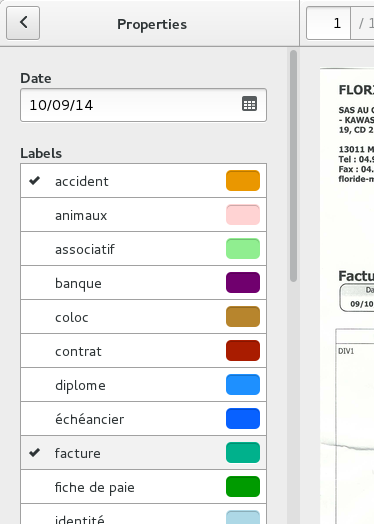
 ### Labels
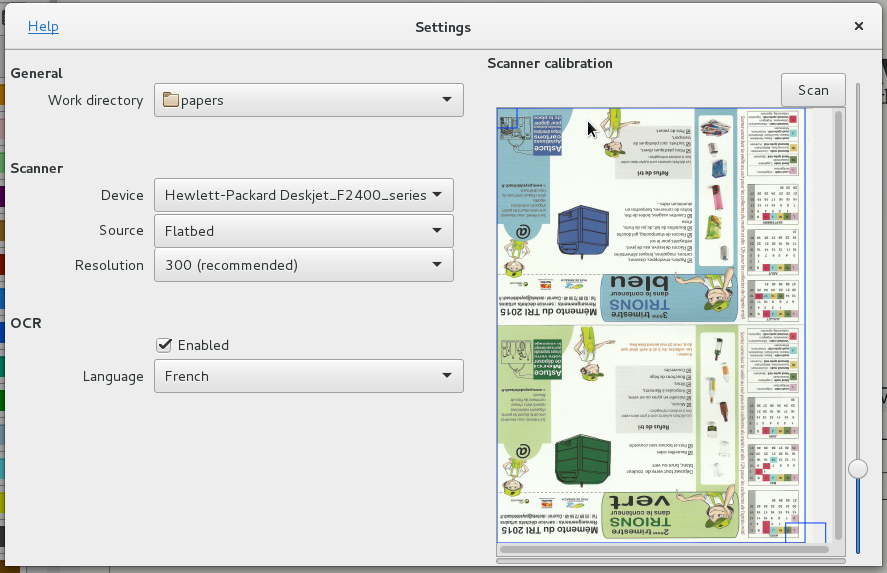
 ### Settings window
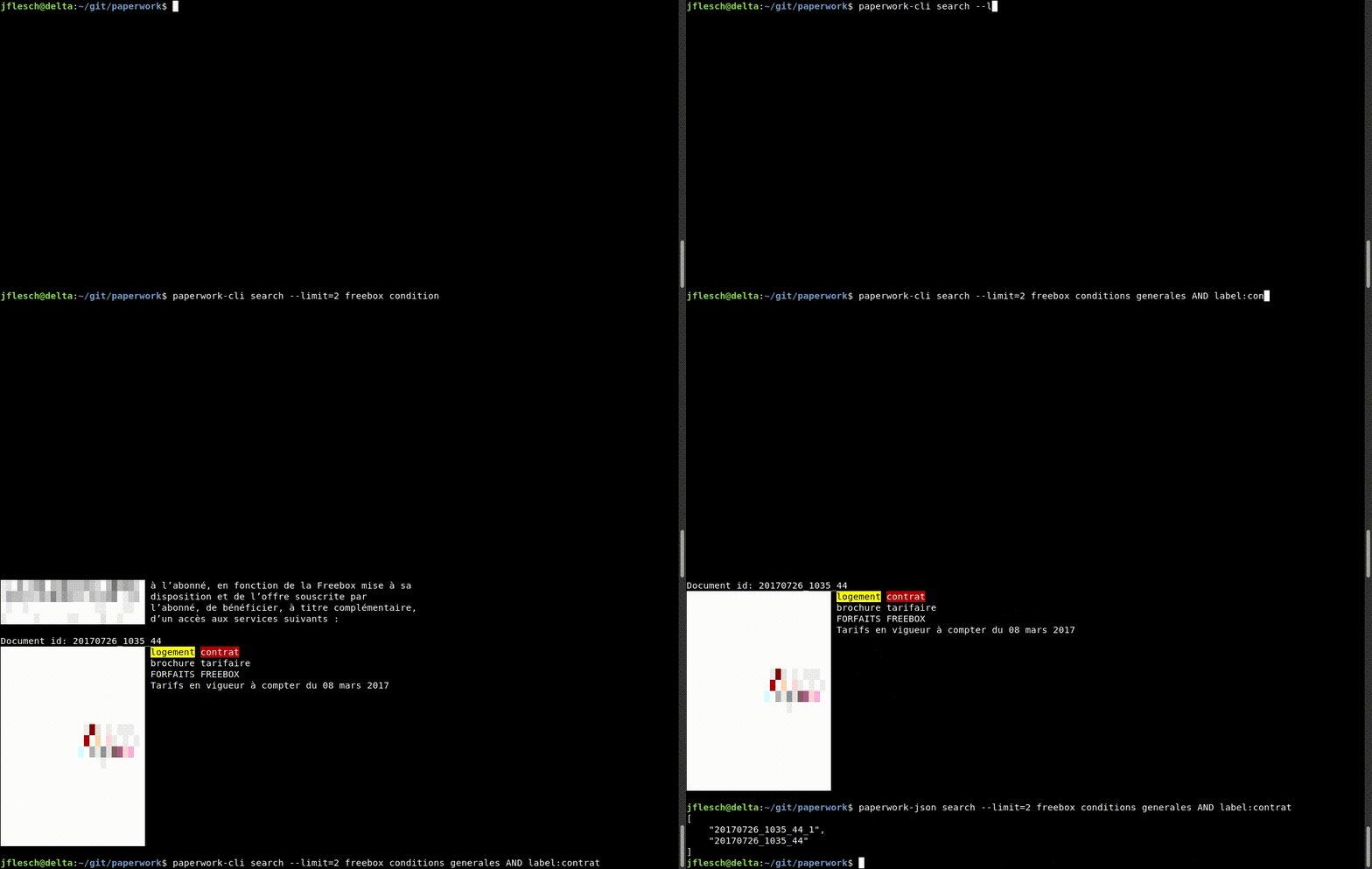
 ### Command line
## Main features
* Scan
* Automatic detection of page orientation
* OCR
* Document labels
* Automatic guessing of the labels to apply on new documents
* Search
* Keyword suggestions
* Quick edit of scans
* PDF support
* [Kick-ass command line interface](/paperwork-shell/README.markdown)
Papers are organized into documents. Each document contains pages.
## Installation
Note regarding updates:
If you're upgrading from a previous version installed with pip, it is strongly recommended you uninstall
it first before installing the new version.
* GNU/Linux:
* Distribution-specific methods:
* [GNU/Linux Archlinux](doc/install.archlinux.markdown)
* [GNU/Linux Debian](doc/install.debian.markdown)
* [GNU/Linux Fedora](doc/install.fedora.markdown)
* [GNU/Linux Gentoo](doc/install.gentoo.markdown)
* [GNU/Linux Ubuntu](doc/install.debian.markdown)
* [Using Flatpak](doc/install.flatpak.markdown)
* [GNU/Linux Development](doc/install.devel.markdown)
* Microsoft Windows:
* [Installer](https://openpaper.work)
* [Development](doc/devel.windows.markdown)
## Uninstallation
### GNU/Linux
[Doc](doc/uninstall.linux.markdown)
### Windows
If you used the installer from [OpenPaper](https://openpaper.work), Paperwork can be uninstalled like any
other Windows application (something like Control Panel --> Applications --> Uninstall).
If you installed it manually (for development), you can follow the same process than for
[GNU/Linux](doc/uninstall.linux.markdown)
## Donate
[Help us help you ! ;-)](https://www.patreon.com/openpaper)
## Contact/Help
* [Extra documentation / FAQ / Tips / Wiki](https://gitlab.gnome.org/World/OpenPaperwork/paperwork/wikis/)
* [Forum](https://forum.openpaper.work/)
* [IRC](https://gitlab.gnome.org/World/OpenPaperwork/paperwork/wikis/Contact#irc)
* [Bug tracker](https://gitlab.gnome.org/World/OpenPaperwork/paperwork/wikis/Contact#bug-trackers)
* [Contributing to Paperwork](https://gitlab.gnome.org/World/OpenPaperwork/paperwork/wikis/Contributing)
## Details
It mainly uses:
* [Sane](http://www.sane-project.org/)/[Libinsane](https://gitlab.gnome.org/World/OpenPaperwork/libinsane#readme): To scan the pages
* [Tesseract](https://github.com/tesseract-ocr)/[Pyocr](https://gitlab.gnome.org/World/OpenPaperwork/pyocr#readme): To extract the words from the pages (OCR)
* [GTK](http://www.gtk.org/): For the user interface
* [Whoosh](https://pypi.python.org/pypi/Whoosh/): To index and search documents, and provide keyword suggestions
* [Simplebayes](https://pypi.python.org/pypi/simplebayes/): To guess the labels
* [Pillow](https://pypi.python.org/pypi/Pillow/)/[Libpillowfight](https://gitlab.gnome.org/World/OpenPaperwork/libpillowfight): Image manipulation
## Licence
GPLv3 or later. See COPYING.
## Development
All the information can be found on [the wiki](https://gitlab.gnome.org/World/OpenPaperwork/paperwork/wikis).
### Command line

## Main features
* Scan
* Automatic detection of page orientation
* OCR
* Document labels
* Automatic guessing of the labels to apply on new documents
* Search
* Keyword suggestions
* Quick edit of scans
* PDF support
* [Kick-ass command line interface](/paperwork-shell/README.markdown)
Papers are organized into documents. Each document contains pages.
## Installation
Note regarding updates:
If you're upgrading from a previous version installed with pip, it is strongly recommended you uninstall
it first before installing the new version.
* GNU/Linux:
* Distribution-specific methods:
* [GNU/Linux Archlinux](doc/install.archlinux.markdown)
* [GNU/Linux Debian](doc/install.debian.markdown)
* [GNU/Linux Fedora](doc/install.fedora.markdown)
* [GNU/Linux Gentoo](doc/install.gentoo.markdown)
* [GNU/Linux Ubuntu](doc/install.debian.markdown)
* [Using Flatpak](doc/install.flatpak.markdown)
* [GNU/Linux Development](doc/install.devel.markdown)
* Microsoft Windows:
* [Installer](https://openpaper.work)
* [Development](doc/devel.windows.markdown)
## Uninstallation
### GNU/Linux
[Doc](doc/uninstall.linux.markdown)
### Windows
If you used the installer from [OpenPaper](https://openpaper.work), Paperwork can be uninstalled like any
other Windows application (something like Control Panel --> Applications --> Uninstall).
If you installed it manually (for development), you can follow the same process than for
[GNU/Linux](doc/uninstall.linux.markdown)
## Donate
[Help us help you ! ;-)](https://www.patreon.com/openpaper)
## Contact/Help
* [Extra documentation / FAQ / Tips / Wiki](https://gitlab.gnome.org/World/OpenPaperwork/paperwork/wikis/)
* [Forum](https://forum.openpaper.work/)
* [IRC](https://gitlab.gnome.org/World/OpenPaperwork/paperwork/wikis/Contact#irc)
* [Bug tracker](https://gitlab.gnome.org/World/OpenPaperwork/paperwork/wikis/Contact#bug-trackers)
* [Contributing to Paperwork](https://gitlab.gnome.org/World/OpenPaperwork/paperwork/wikis/Contributing)
## Details
It mainly uses:
* [Sane](http://www.sane-project.org/)/[Libinsane](https://gitlab.gnome.org/World/OpenPaperwork/libinsane#readme): To scan the pages
* [Tesseract](https://github.com/tesseract-ocr)/[Pyocr](https://gitlab.gnome.org/World/OpenPaperwork/pyocr#readme): To extract the words from the pages (OCR)
* [GTK](http://www.gtk.org/): For the user interface
* [Whoosh](https://pypi.python.org/pypi/Whoosh/): To index and search documents, and provide keyword suggestions
* [Simplebayes](https://pypi.python.org/pypi/simplebayes/): To guess the labels
* [Pillow](https://pypi.python.org/pypi/Pillow/)/[Libpillowfight](https://gitlab.gnome.org/World/OpenPaperwork/libpillowfight): Image manipulation
## Licence
GPLv3 or later. See COPYING.
## Development
All the information can be found on [the wiki](https://gitlab.gnome.org/World/OpenPaperwork/paperwork/wikis).