# testnet
**Repository Path**: george93_admin/testnet
## Basic Information
- **Project Name**: testnet
- **Description**: No description available
- **Primary Language**: Unknown
- **License**: Not specified
- **Default Branch**: main
- **Homepage**: None
- **GVP Project**: No
## Statistics
- **Stars**: 2
- **Forks**: 2
- **Created**: 2024-09-27
- **Last Updated**: 2024-11-27
## Categories & Tags
**Categories**: Uncategorized
**Tags**: None
## README
## TestNet Asset Management System Introduction
[简体中文](./README) / English
The TestNet Asset Management System aims to provide comprehensive and efficient internet asset management and monitoring services, building a detailed asset information library. This system can help enterprise security teams or penetration testers conduct in-depth reconnaissance and analysis of target assets, provide continuous risk monitoring from an attacker's perspective, assist users in real-time understanding of asset dynamics, identify and fix security vulnerabilities, effectively reduce the attack surface, and enhance overall security protection capabilities.
### Current Features
- [X] Project Management
- [X] Asset Management (company, domains, subdomains, IPs, ports, web, API, vulnerabilities, asset tags, blacklist, etc.)
- [X] Asset Import and Export
- [X] Advanced Search
- [X] Custom Scan Scripts
- [X] Batch Scanning & Scheduled Tasks
- [X] Custom Node Configuration
**Built-in tool scripts, and you can add other tools as needed:**
- [X] Subdomain Scanning (OneForAll, subfinder)
- [X] Port Scanning (Nmap, Naabu)
- [X] Web Detection (Httpx)
- [X] Vulnerability Scanning (Nuclei)
- [X] DNS Resolution (CDN and live detection)
- [X] Sensitive Directory Scanning (DirSearch)
- [X] ICP Filing Query
- [X] 0.zone API Call
#### Quick Start
### 1. **Quick Installation**
### Linux and Mac
```bash
git clone https://github.com/testnet0/testnet.git
cd testnet && bash build.sh
```
After a short wait, the system will start. The default access port is `https://IP:8099`.
### Windows
Refer to the help documentation.
### 2. **Default Passwords**
- **Security Testing**: `TestNet/TestNet123@`
- **Admin**: `admin/123456`
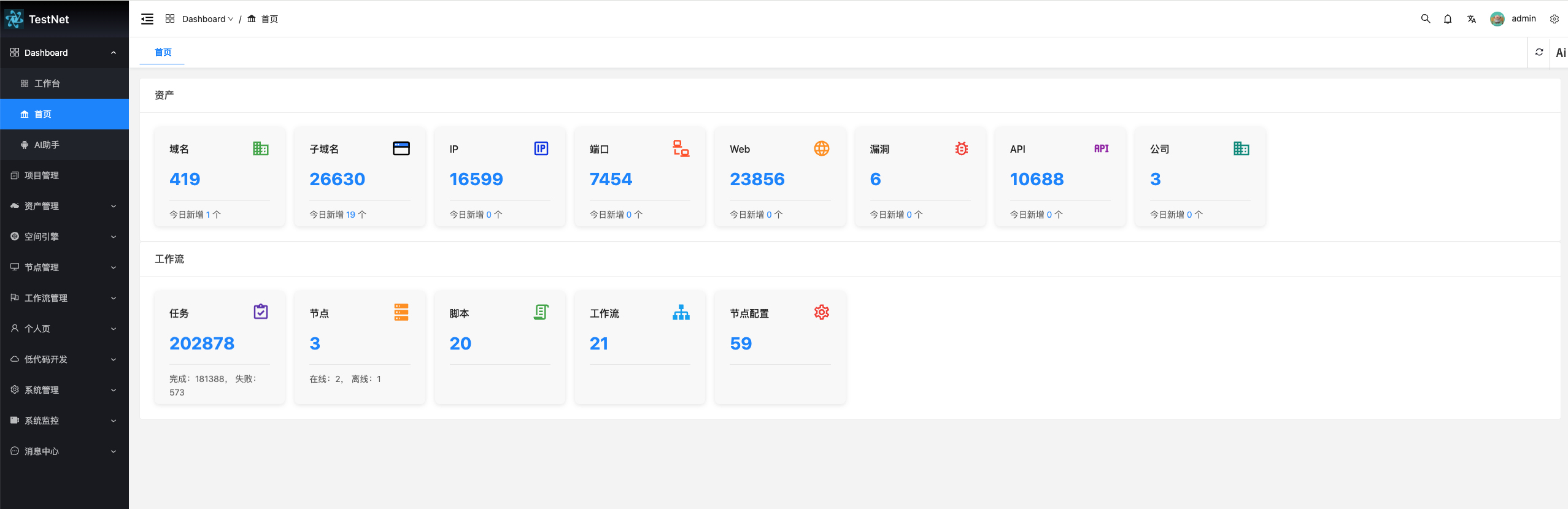
### 3. System Interface
### 4. Contact Us
If you have any questions or suggestions, feel free to contact me.
 ### Detailed Documentation Link
- [TestNet Wiki](https://github.com/testnet0/testnet/wiki)
### Source Code
- [Frontend Source Code](https://github.com/testnet0/testnet-vue3)
- [Backend and Client Source Code](https://github.com/testnet0/testnet-java)
### Detailed Documentation Link
- [TestNet Wiki](https://github.com/testnet0/testnet/wiki)
### Source Code
- [Frontend Source Code](https://github.com/testnet0/testnet-vue3)
- [Backend and Client Source Code](https://github.com/testnet0/testnet-java)