# Windows-Use
**Repository Path**: crazymonkey186/Windows-Use
## Basic Information
- **Project Name**: Windows-Use
- **Description**: No description available
- **Primary Language**: Unknown
- **License**: MIT
- **Default Branch**: main
- **Homepage**: None
- **GVP Project**: No
## Statistics
- **Stars**: 0
- **Forks**: 0
- **Created**: 2025-08-11
- **Last Updated**: 2025-08-11
## Categories & Tags
**Categories**: Uncategorized
**Tags**: None
## README
**Windows-Use** 是一个强大的自动化代理,能够在GUI层面直接与Windows系统交互。它架起了AI代理与Windows操作系统之间的桥梁,可以执行打开应用程序、点击按钮、输入文本、执行shell命令和捕获UI状态等任务,而无需依赖传统的计算机视觉模型。这使得任何LLM都能执行计算机自动化,而不必依赖特定的模型。
## 🛠️安装指南
### **前提条件**
- Python 3.12或更高版本
- [UV](https://github.com/astral-sh/uv)(或`pip`)
- Windows 7、8、10或11
### **安装步骤**
**使用`uv`安装:**
```bash
uv pip install windows-use
````
或使用pip:
```bash
pip install windows-use
```
## ⚙️基本用法
```python
# main.py
from langchain_google_genai import ChatGoogleGenerativeAI
from windows_use.agent import Agent
from dotenv import load_dotenv
load_dotenv()
llm=ChatGoogleGenerativeAI(model='gemini-2.0-flash')
agent = Agent(llm=llm,browser='chrome',use_vision=True)
query=input("输入您的查询: ")
agent_result=agent.invoke(query=query)
print(agent_result.content)
```
## 🤖 运行代理
您可以使用以下命令从脚本运行:
```bash
python main.py
输入您的查询: <您的任务>
```
---
## 🎥 演示
**提示:** 写一篇关于LLM的简短说明并保存到桌面
**提示:** 从深色模式切换到浅色模式
## 📈 基础架构


## 愿景
与您的计算机对话,看着它完成任务。
## 星标历史
[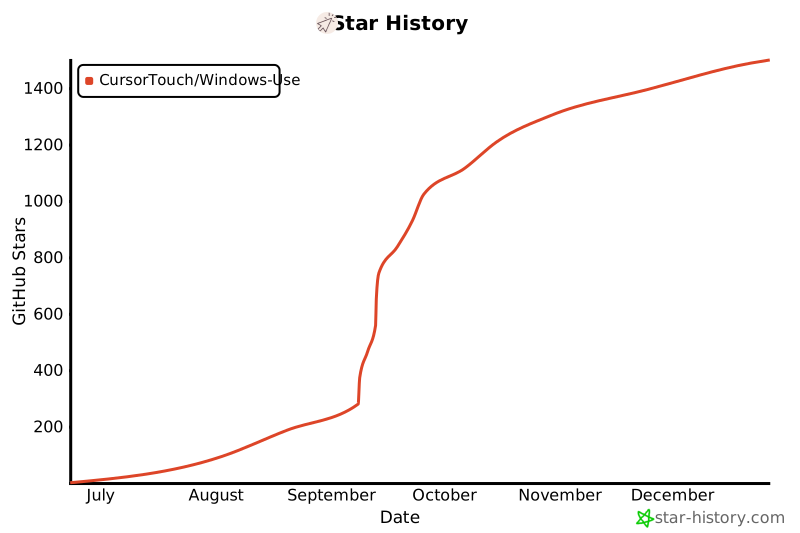](https://www.star-history.com/#CursorTouch/Windows-Use&Date)
## ⚠️ 注意事项
代理直接在GUI层与Windows操作系统交互以执行操作。虽然代理设计为智能且安全地运行,但它可能会出错,可能导致不期望的系统行为或意外更改。尝试在沙箱环境中运行代理。
## 🪪 许可证
本项目采用MIT许可证 - 详见[LICENSE](LICENSE)文件了解详情。
## 🤝 贡献
欢迎贡献!请查看[CONTRIBUTING](CONTRIBUTING)文件了解设置和开发工作流程。
由[Jeomon George](https://github.com/Jeomon) 用心制作
---
## 引用
```bibtex
@software{
author = {George, Jeomon},
title = {Windows-Use: 让AI能够控制Windows操作系统},
year = {2025},
publisher = {GitHub},
url={https://github.com/CursorTouch/Windows-Use}
}
```